The Documentation Challenge
Most SAP Datasphere projects begin with reasonable documentation.
At the start of an implementation, the landscape is small enough for architects and developers to explain the design from memory. A few diagrams describe the main data flows. A spreadsheet lists the key objects. A Word document records the technical design. During early delivery this may be sufficient.
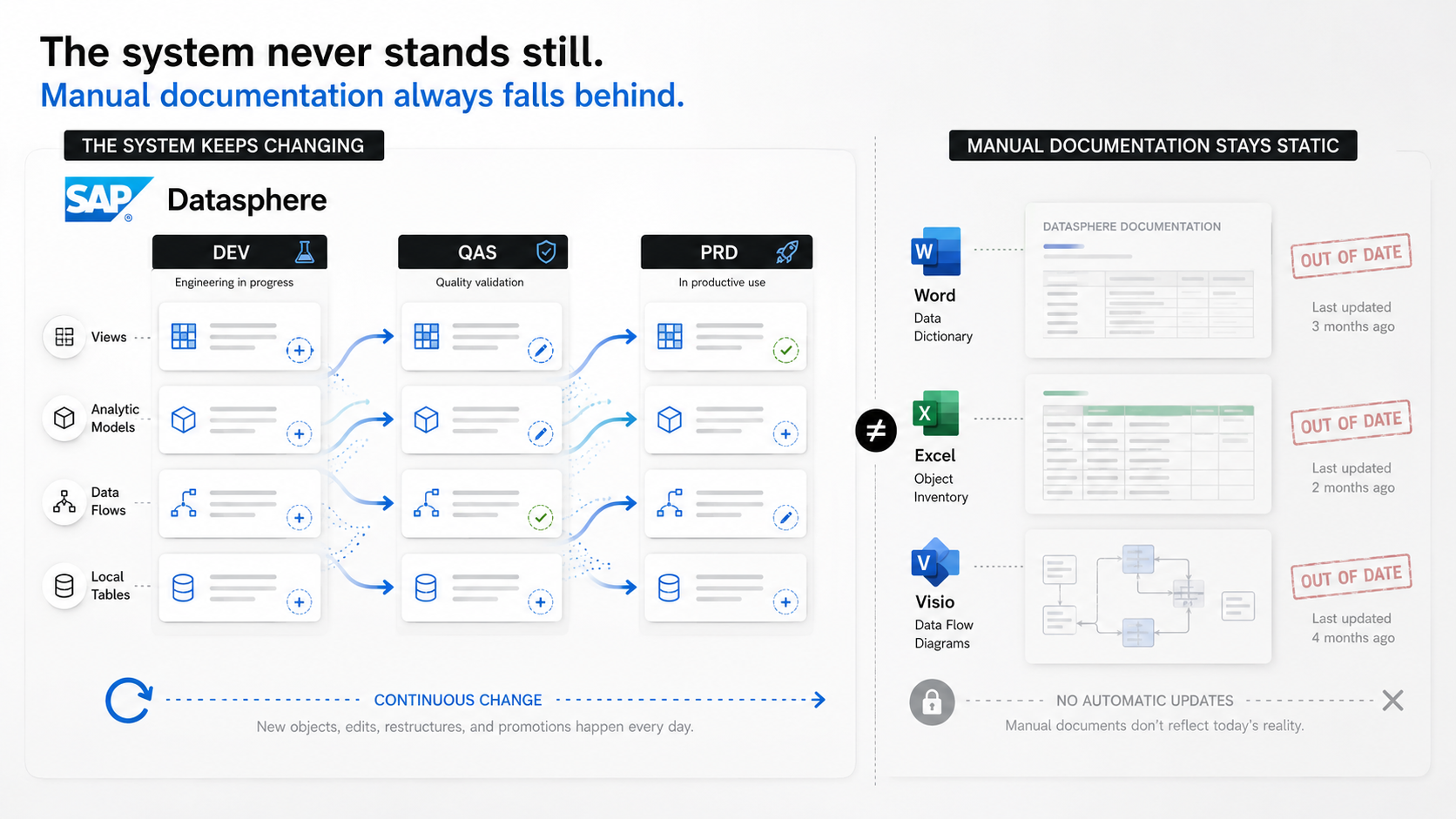
The challenge is not creating documentation—it is keeping it current.
As the platform matures, SAP Datasphere landscapes often expand rapidly. More spaces are introduced. Development, quality and production environments drift unless they are carefully controlled. Analytic Models consume fact views, fact views consume calculation views or local tables, and reusable dimensions are shared across multiple reporting scenarios. A small number of objects can quickly become hundreds or thousands of interconnected artefacts.
At that point, manual documentation becomes fragile.
The documentation may still exist, but it no longer represents the system accurately. A diagram created during design may not show the latest associations. A table of objects may not include new staging views. A lineage picture may stop at the first layer instead of showing the complete upstream chain. When the documentation is out of date, it stops being trusted. Once it stops being trusted, teams stop using it.
This creates practical delivery and support problems:
- new team members need longer to understand the landscape
- impact analysis takes more time than it should
- production support relies on a small number of experienced developers
- project handovers become inconsistent
- auditors receive static evidence rather than current system information
- architecture decisions become harder to validate
- changes are made without a clear understanding of downstream impact
The problem is not that teams do not value documentation. The problem is that maintaining documentation manually across a changing SAP Datasphere landscape is expensive, repetitive and easy to neglect.
Looking for a more sustainable approach
For this evaluation we were interested in one specific question:
Can useful SAP Datasphere documentation be generated directly from the system rather than written and maintained manually?
That question led us to explore ECMT Cloud. ECMT is positioned as a governance, documentation, audit and change management platform for SAP Datasphere. The wider product includes areas such as snapshots, environment comparison, audit reporting, package management and transport governance. For this first look, however, we deliberately focused on the documentation capability.
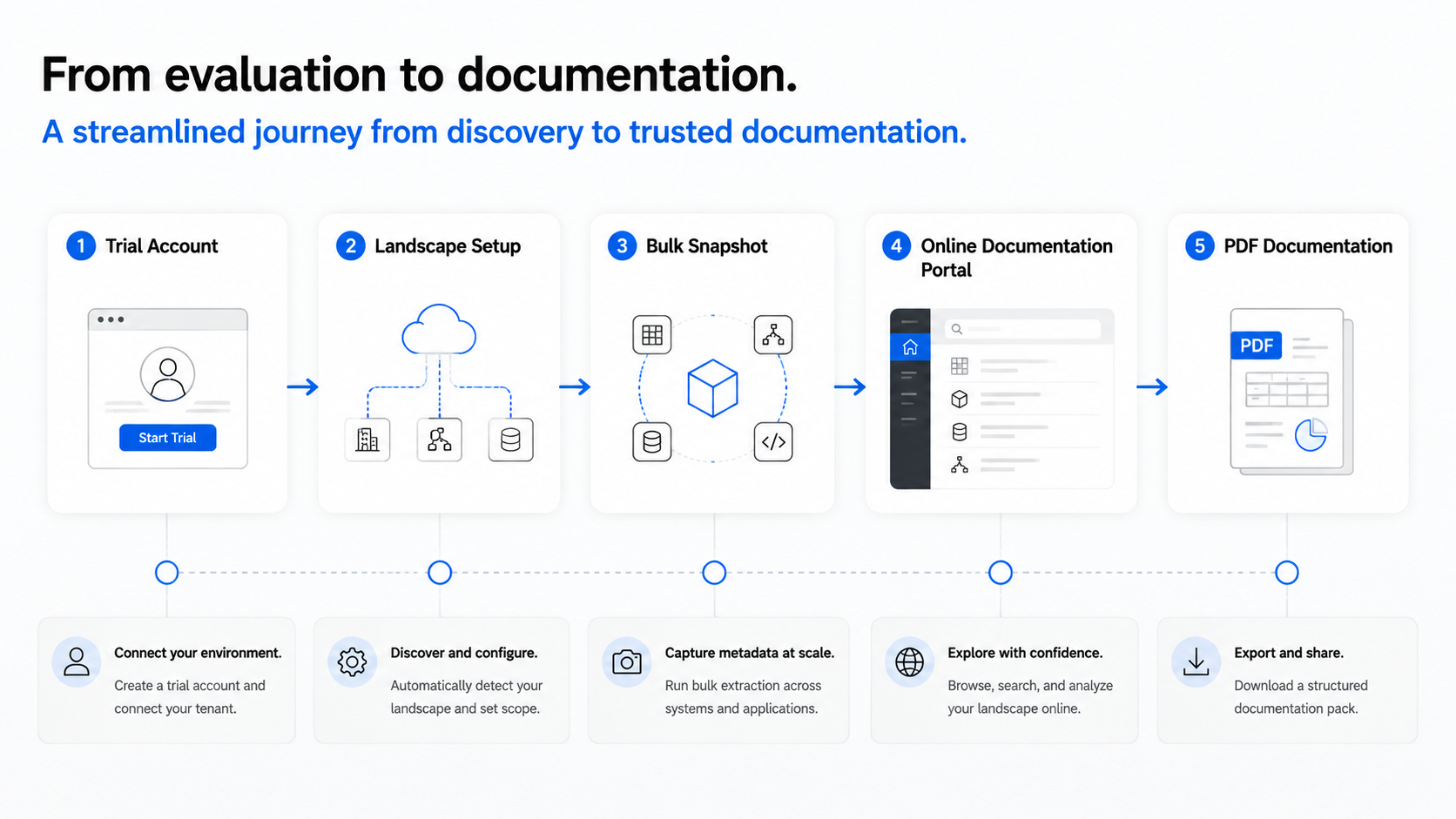
The evaluation was intentionally practical. We were not trying to reproduce a vendor demo. We wanted to start from a trial account, connect a Datasphere landscape, capture metadata, publish an online documentation portal and generate a PDF that could realistically be used for technical handover or audit evidence.
That is an important distinction. Many tools can produce a list of objects. What we wanted to understand was whether ECMT could produce documentation that was structured, navigable and useful enough for a real project team.
Step 1 – Creating a trial account
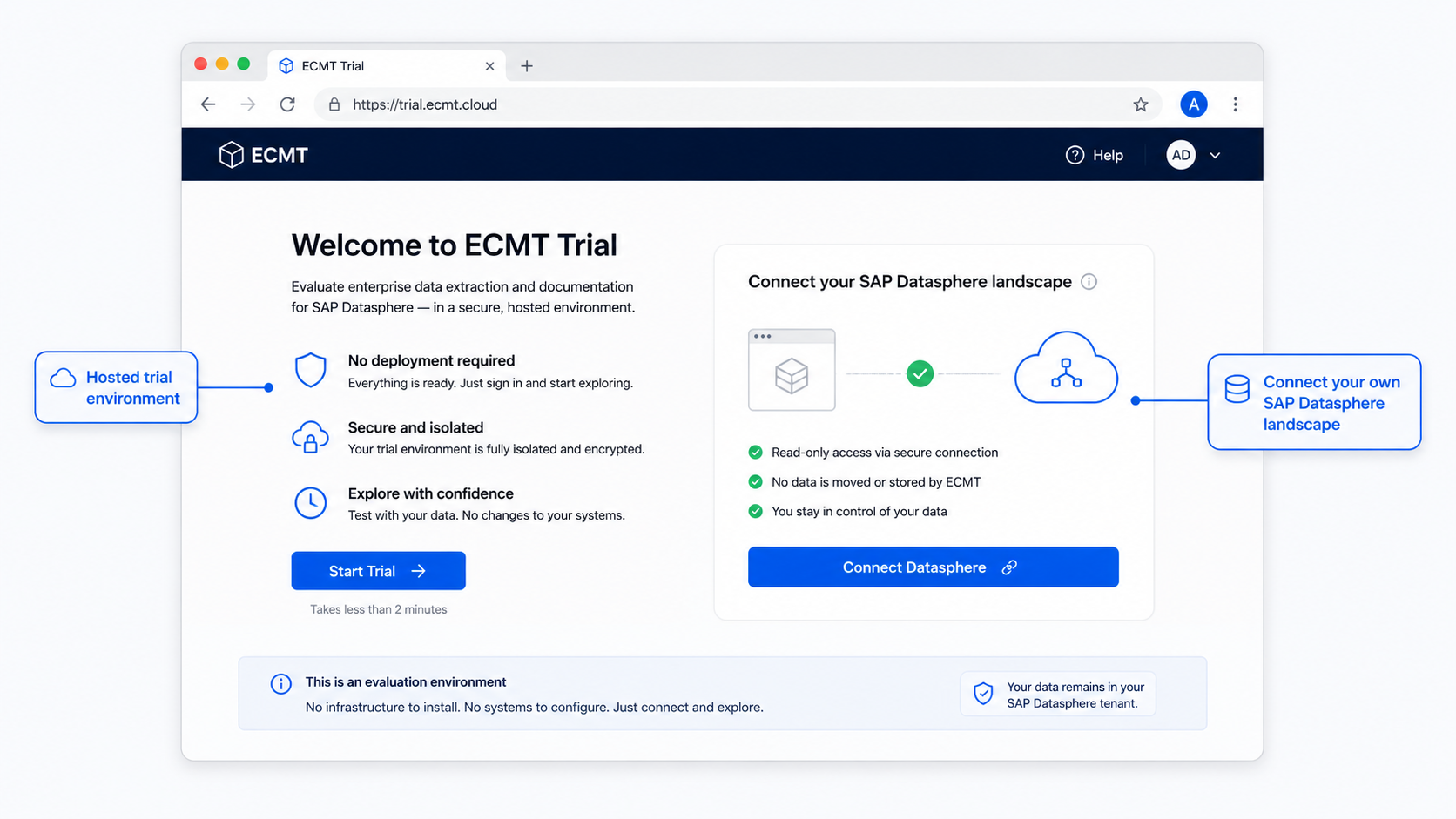
The starting point was the hosted ECMT trial.
From an evaluator’s perspective this is useful because there is no local software stack to install before assessing the documentation capability. The trial allows the documentation workflow to be tested against a real SAP Datasphere tenant, provided the necessary tenant connectivity and security configuration is completed.
For a consultancy or internal architecture team, this matters. The value of a documentation engine can only really be judged using realistic metadata. A small artificial example may prove that the screens work, but it does not show how the tool behaves when objects have several upstream layers, multiple associations, variables, measures and mixed object types.
The first login experience should therefore be seen as the beginning of a landscape onboarding exercise rather than the start of a documentation writing task. ECMT needs access to the metadata before it can build anything useful.
Step 2 – Connecting SAP Datasphere
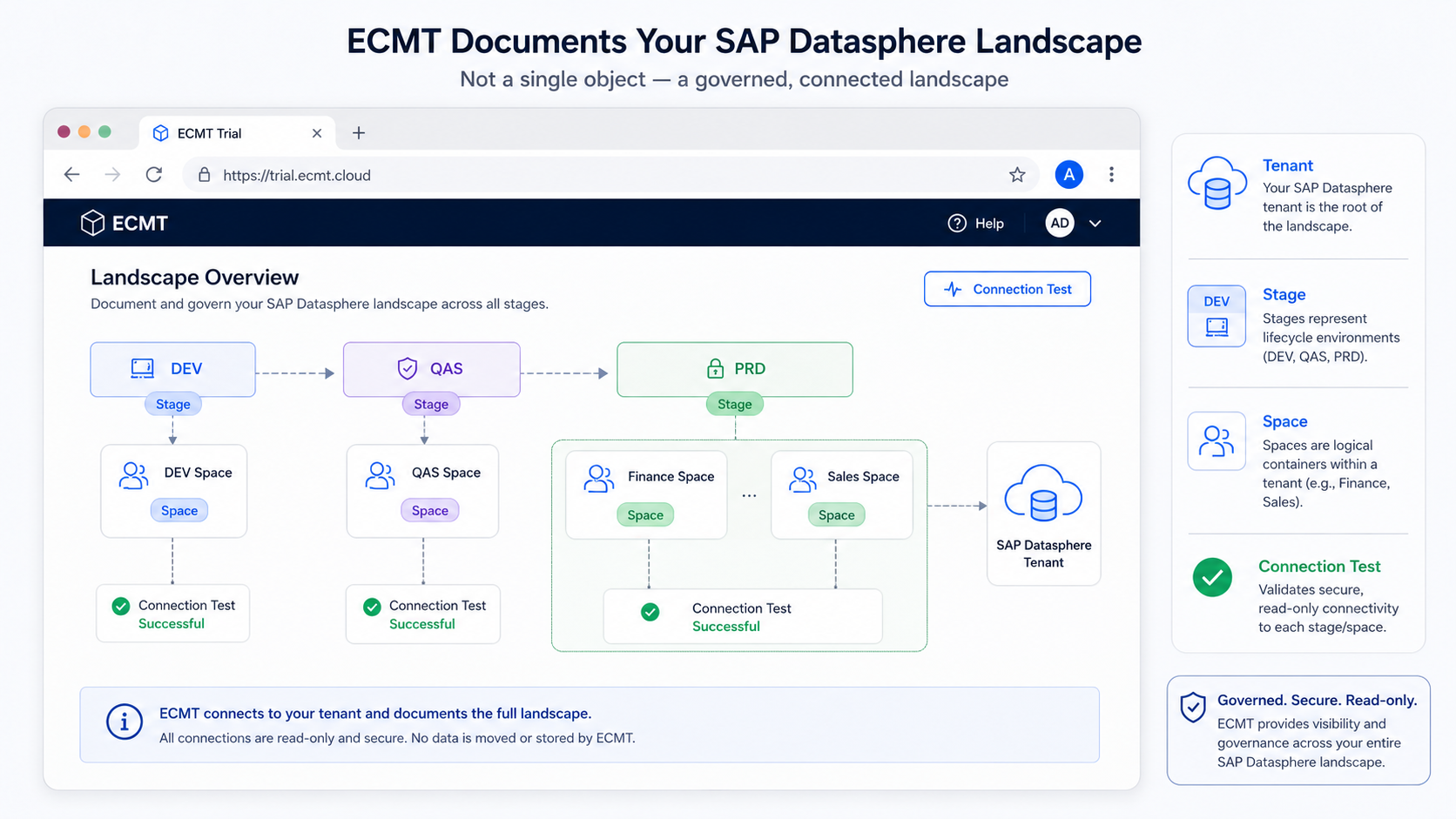
Before ECMT can document a landscape, it needs to connect to SAP Datasphere.
At a high level, this involves configuring a technical connection using OAuth credentials and ensuring the ECMT application is allowed to communicate with the Datasphere tenant. In a controlled enterprise environment this step should be treated like any other integration setup: the technical user should have appropriate permissions, secrets should be handled securely, and the connection should be tested before any metadata capture is started.
Once the tenant is connected, ECMT can model the broader landscape. This includes the concept of tenants, lifecycle stages and spaces. In a typical setup, stages such as DEV, QAS and PRD represent the way changes move through the landscape. Spaces then represent the individual Datasphere spaces that ECMT will analyse, snapshot or document.
This is an important design step. Documentation is only useful if the structure of the documentation matches the way the organisation thinks about its landscape. A production finance space, a shared dimension space and a development sandbox should not all be treated as the same thing if they play different roles in the delivery model.
For our evaluation, the key objective was to connect a production-like space and make sure ECMT could read enough metadata to generate a meaningful documentation output.
Step 3 – Capturing a Bulk Snapshot
The next step was to capture a Bulk Snapshot.
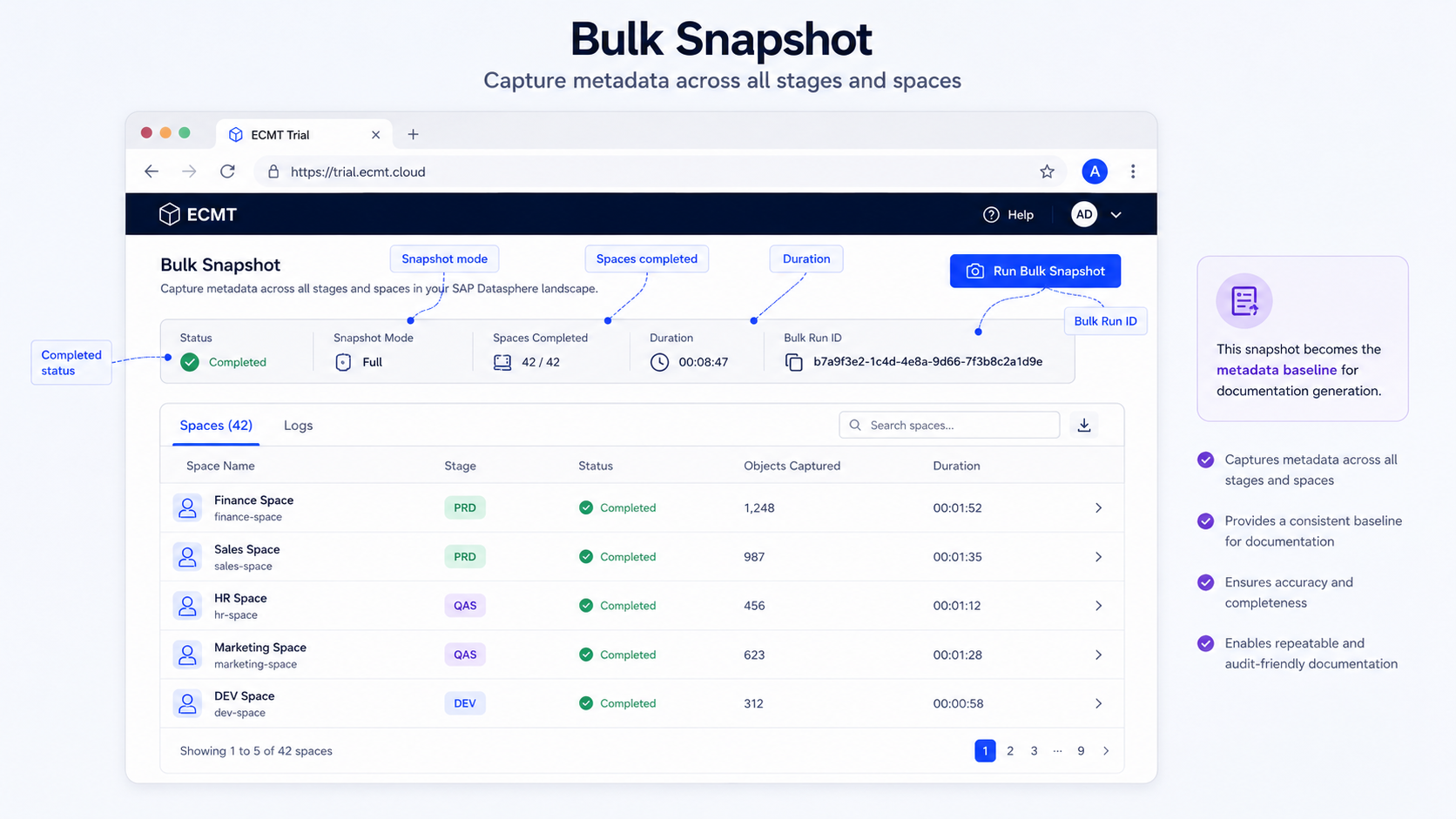
This is where the documentation process starts to become more interesting. Rather than asking the user to manually list objects, ECMT captures metadata from the selected Datasphere spaces and stores a point-in-time view of the landscape. That snapshot then becomes the foundation for documentation, comparison and historical analysis.
From a governance perspective, this is valuable because a snapshot is more than a convenience feature. It creates a baseline. If a team generates documentation today, they can tie that documentation to a known metadata capture rather than an undefined state of the system. If the landscape changes tomorrow, the next snapshot can show what changed.
In our test run, the Bulk Snapshot screen provided a history of completed runs, including status, duration, snapshot mode, space completion and a Bulk Run ID. That level of operational feedback is useful because metadata capture can become a background process in larger environments. Teams need to know whether the scan completed, how long it took and whether any spaces failed.
For documentation purposes, the most important point is that ECMT is not asking the user to describe the system manually. It is building its understanding from the system itself.
Step 4 – Publishing the online documentation portal
Once metadata has been captured, ECMT can publish an online documentation portal.
This was one of the stronger parts of the evaluation. PDF documentation is useful, especially for formal handover, audits and offline review. But day-to-day technical exploration is often better served by a searchable portal.
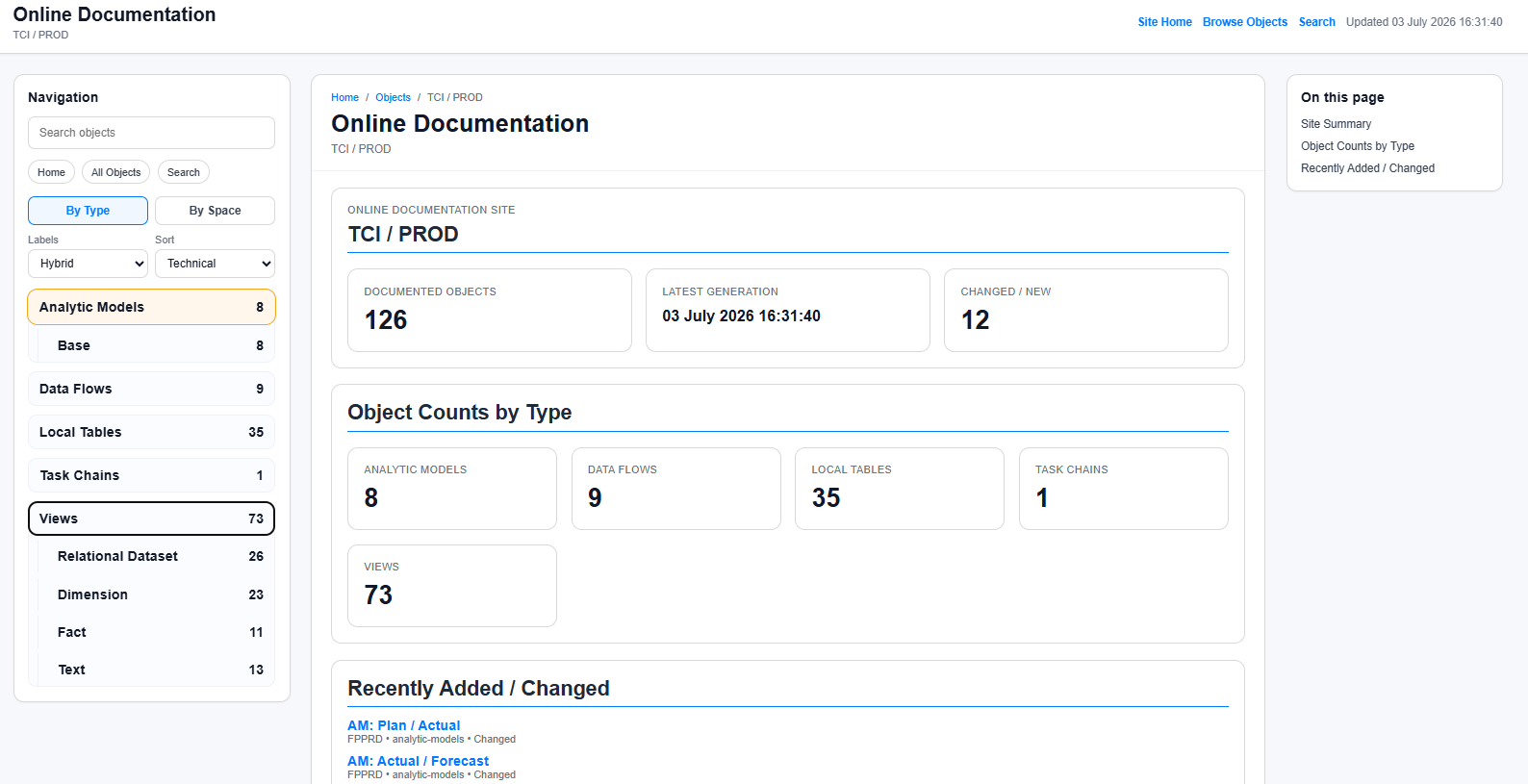
The online portal provides a more interactive way to explore the landscape. Users can browse documented objects by type, search for specific object names and navigate through the available spaces. Summary information such as object counts and latest generation date gives the reader immediate context.
In the screenshot we reviewed, the portal showed a production landscape with documented object counts across Analytic Models, Data Flows, Local Tables, Task Chains and Views. That kind of landing page is useful because it helps a developer, architect or support analyst quickly understand the scale and composition of the documented area.
The practical benefit is not simply that documentation exists. It is that documentation becomes discoverable.
A new developer can search for an Analytic Model and work backwards through its dependencies. A support analyst can browse by type to find the relevant Data Flow or Table. An architect can use the object counts and latest generation timestamp to understand whether the published documentation is current enough for review.
This is a very different experience from opening a folder of static documents and hoping the right version is inside.
Step 5 – Generating PDF documentation
The final stage of the evaluation was PDF generation.
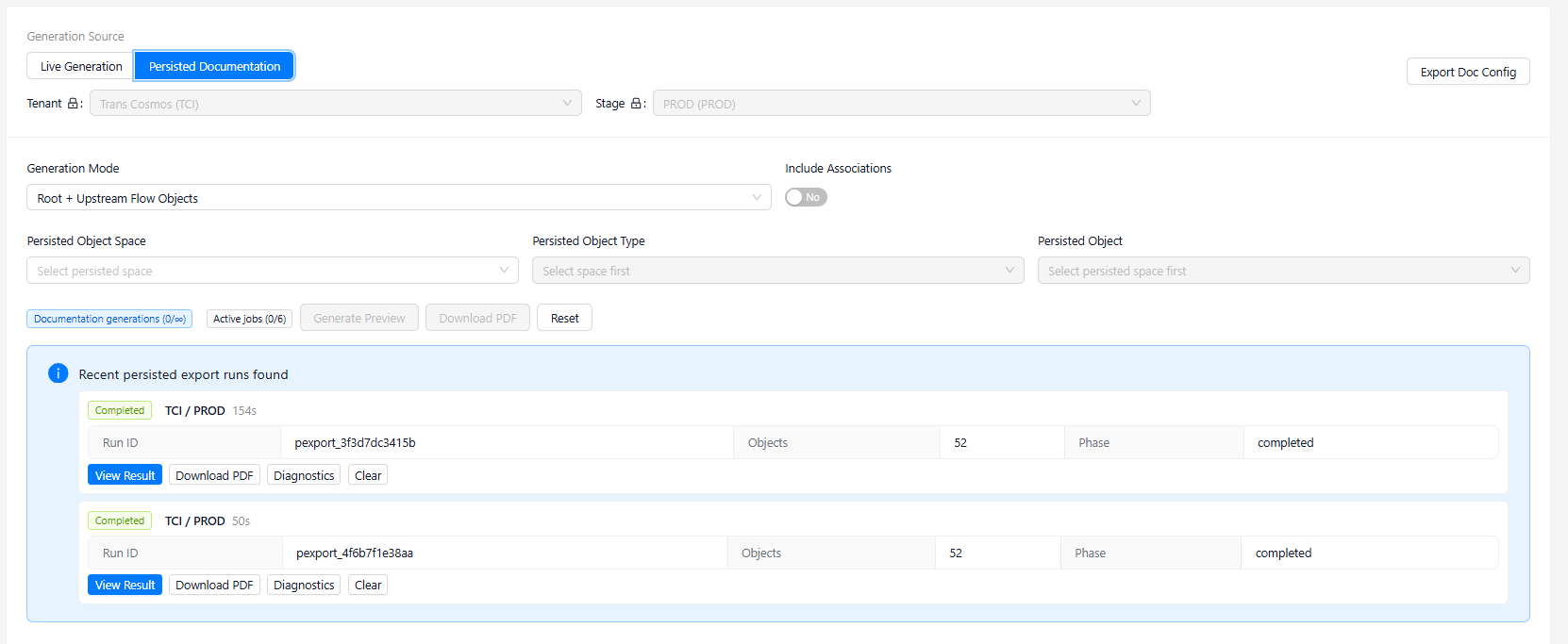
For the sample output, documentation was generated for an Analytic Model using a dependency-aware mode that included upstream flow objects. Associations were enabled so that the generated output could include a broader view of object relationships.
This is where generated documentation becomes materially different from a simple object list. A good technical document for SAP Datasphere needs to explain not only the selected object, but also the context around it:
- what type of object it is
- where it sits in the landscape
- which upstream objects feed it
- which dimensions, variables and measures it exposes
- which tables and views are involved
- how the dependency chain is structured
- when the documentation was generated
- which snapshot it was based on
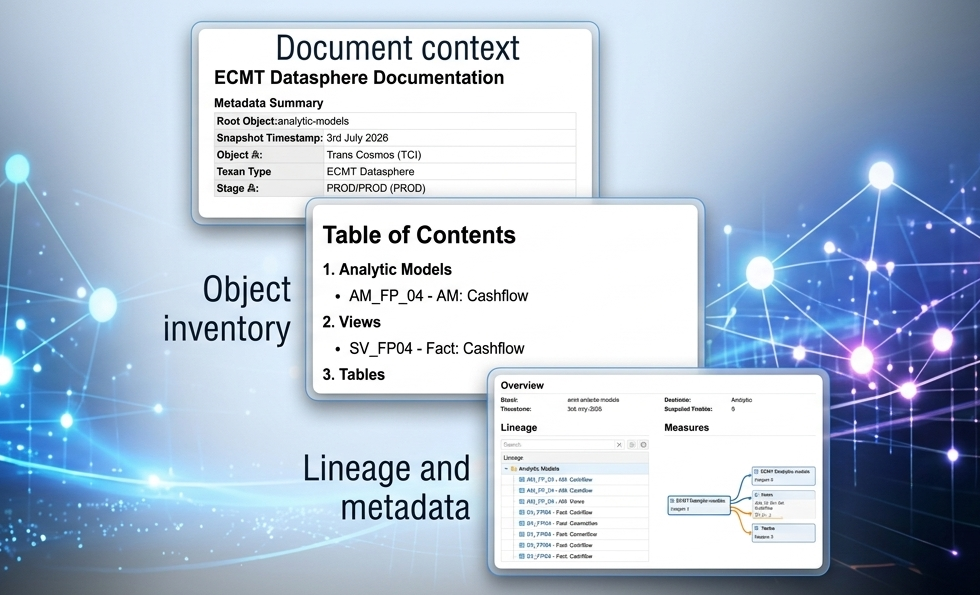
The generated PDF did exactly that for the sample Analytic Model. The document included a summary page, table of contents, object chapters, lineage information, measures, variables, dimensions, technical metadata and dependency diagrams. The sample generated output ran to 135 pages, covering a root Analytic Model and its upstream object network.
That level of detail is important for project handover. A handover document that only describes the final Analytic Model is rarely sufficient. Support teams need to understand the upstream views, local tables and data flows. Architects need to understand relationships and dependency depth. Auditors may need evidence that technical design information can be reproduced from the system.
Reviewing the Generated Documentation
The generated PDF is where ECMT’s documentation capability becomes tangible.
For the sample Analytic Model, the first pages established the documentation context: generation mode, execution type, stage, space, root object, snapshot timestamp, total objects and object types. This is useful because the document is self-describing. A reader does not have to guess which tenant, space or snapshot the document relates to.
The table of contents then grouped the output into object categories. In the sample document, the generated documentation covered Analytic Models, Views, Tables and Flows. That structure helps the reader navigate the document in the same way they would reason about the solution architecture.
The object-level sections were also useful. For the Analytic Model, the documentation included classification information, created and changed metadata, fact sources, dimensions, variables, measures and lineage. The lineage section was particularly important because it showed the upstream chain from the root Analytic Model through fact views, join views, staging views and local tables.
This is the kind of information that is difficult to maintain manually. A developer can document the main model when it is first built, but upstream chains change as enhancements are delivered. Automatically deriving the lineage from metadata reduces the risk that the documentation describes yesterday’s design rather than today’s system.
The PDF also included diagrams showing how objects consume one another. Even where a diagram is not a replacement for a full architecture discussion, it provides a useful entry point. A support analyst can see the shape of the dependency chain before drilling into individual objects.
Download the Example Documentation
We have included the sample generated PDF alongside this article so readers can inspect the output directly.
Download the 135-page example ECMT documentation PDF to explore the generated output, including the document summary, table of contents, lineage diagrams, object metadata, variables, measures and dependency analysis.
This is useful because documentation quality is difficult to judge from a screenshot alone. The structure, page count, table of contents and object-level detail are easier to understand when reviewing the complete document.
Where automated documentation fits
Automated documentation is not a replacement for architecture thinking.
A generated document can tell you what exists, how objects relate, and which metadata has been captured. It cannot fully explain why a design decision was made, what alternatives were rejected, or how the model supports a particular business process. Those responsibilities still sit with the architecture and delivery team.
However, automated documentation can remove a large amount of low-value manual effort.
Instead of manually listing every object, field, association and upstream dependency, teams can focus their written documentation on the parts that require human judgement:
- design rationale
- business context
- naming standards
- modelling conventions
- performance considerations
- known limitations
- support procedures
- ownership and governance
This is where ECMT appears to fit well. It can generate the technical baseline, while the project team adds interpretation and decision context around it.
For organisations with regulated reporting, complex finance models or large multi-space landscapes, this distinction matters. Audit and support teams usually need both system-derived evidence and human explanation. A generated documentation pack can provide the evidence; the architecture narrative can explain the intent.
Our initial observations
From this first evaluation, ECMT’s documentation capability made a positive impression.
The strongest point is that the documentation is generated from captured metadata rather than manually assembled. This immediately addresses one of the biggest weaknesses of traditional technical documentation: drift.
The online portal is also valuable because it changes how documentation is consumed. Instead of treating documentation as a document that is opened only at handover, it becomes a browsable knowledge base for developers, architects and support teams.
The PDF output is useful for a different reason. It creates a formal artefact that can be stored, shared, reviewed and attached to project or audit evidence. The fact that the PDF includes document context, object metadata, lineage and dependency information makes it much more useful than a simple export.
There are also practical considerations. The quality of the generated documentation will depend on the quality of the underlying Datasphere metadata. Poor naming, inconsistent business names and weak modelling conventions will still be visible in the output. Automated documentation does not hide poor design discipline; it exposes it.
That is not a criticism. In many ways, it is an advantage. Once documentation is easy to generate, weak naming and inconsistent modelling become easier to identify and address.
What we are exploring next
This article focused specifically on documentation.
The wider ECMT platform includes capabilities beyond documentation, and the next area we are exploring is the Package Builder and its role in SAP Datasphere transport management. This is particularly interesting because many Datasphere teams still rely on manual processes, informal tracking and inconsistent release governance when moving changes between environments.
If ECMT can combine documentation, snapshots, comparisons, package management and approvals into a coherent governance process, it may address a much broader challenge than documentation alone.
For now, our view is deliberately limited: as a documentation engine for SAP Datasphere, ECMT is worth evaluating.
Who is this for?
Based on our evaluation, we believe ECMT delivers the greatest value to organisations that:
- operate multiple SAP Datasphere spaces across several lifecycle stages
- have multiple developers working in parallel
- require formal project handovers and technical documentation
- need current documentation to support governance, audit or compliance activities
- want to reduce the ongoing effort of manually maintaining technical documentation.
Smaller proof-of-concept landscapes may not see the same immediate benefit, but as environments grow the value of automatically generated documentation increases significantly.
Black Barn recommendation
For organisations running small Datasphere proof-of-concepts, manual documentation may still be sufficient.
For organisations running production SAP Datasphere landscapes with multiple spaces, multiple developers and formal governance expectations, automated documentation should be taken seriously. The effort required to maintain documentation manually grows quickly, and the cost of outdated documentation is usually paid later through slower support, weaker handover and less reliable impact analysis.
Our recommendation is to treat automated documentation as part of the wider governance model. It should not sit outside delivery. It should be connected to landscape snapshots, release activity, naming standards and handover processes.
Used in that way, a tool such as ECMT can help make documentation a repeatable operational process rather than a one-off project deliverable.
Conclusion
SAP Datasphere documentation is difficult because SAP Datasphere landscapes are alive. Objects change, dependencies evolve, new spaces are introduced and reporting requirements continue to expand. Static documentation struggles to keep up.
Our first look at ECMT suggests that automated documentation can reduce a significant amount of manual effort. The ability to connect a Datasphere landscape, capture a Bulk Snapshot, publish an online documentation portal and generate a structured PDF creates a practical foundation for technical handover, support and governance.
The most important point is not that ECMT can generate a document. It is that documentation can become repeatable. Once metadata capture and documentation generation are part of the operating model, teams have a better chance of keeping technical knowledge aligned with the actual system.
For SAP Datasphere teams looking to improve documentation discipline, ECMT is worth exploring.
Further Reading
- ECMT Cloud — product information, platform overview and trial access.
- ECMT Help — public documentation and user guidance.
- ECMT Application — hosted application and trial login.
Need expert help with SAP Datasphere or SAP Business Data Cloud?
Black Barn provides independent architecture, implementation, training and advisory services for SAP Datasphere, SAP Analytics Cloud and SAP Business Data Cloud.