LOCATE function, to evaluate configurable calculation references. This article explains a practical pattern for building flexible P&L and Balance Sheet calculations in SAP Datasphere without repeatedly changing the underlying SQL model.
Business problem
Financial reporting requirements rarely remain simple for long.
A Profit and Loss statement or Balance Sheet may begin with one ERP system and one chart of accounts. Over time, the model often needs to support additional source systems, regional reporting structures, different account groupings, acquisition scenarios, management reporting adjustments and alternative statement layouts.
The business expectation is straightforward: users want a consistent reporting output that presents revenue, cost of goods sold, gross profit, operating expenses, operating profit and balance sheet positions in the correct order and with the correct sign.
The technical reality is more complicated.
Different ERP systems may use different account ranges. The same financial statement line may be derived from different account groupings in different systems. Signage may differ between source systems and reporting outputs. Calculation nodes such as Gross Profit or Operating Profit may need to combine multiple configured lines, some positive and some negative.
A common first response is to hard-code the rules into SQL using CASE statements. This works for the first version, but it becomes increasingly expensive to maintain as more statements, ERP systems and reporting variations are added.
The better design is to separate the business configuration from the calculation engine.
Why configuration matters
Configuration-driven modelling keeps the SQL model stable while allowing business rules to evolve.
Instead of embedding every account range, reporting line and calculation rule directly into SQL, those values are stored in a user-maintained configuration table. The SQL layer then interprets the configuration and applies it to the transactional fact data.
This provides several practical advantages:
- account mappings can be changed without rewriting SQL;
- multiple statement layouts can be supported in one model;
- ERP-specific differences can be managed in configuration;
- calculation logic becomes easier to audit;
- the reporting structure is visible to support teams;
- the model is easier to extend when new source systems are added.
This is especially valuable in SAP Datasphere because the modelling layer should remain clean, explainable and reusable. A configuration-driven approach helps avoid large, brittle SQL Views that are full of business-specific exceptions.
Architecture overview
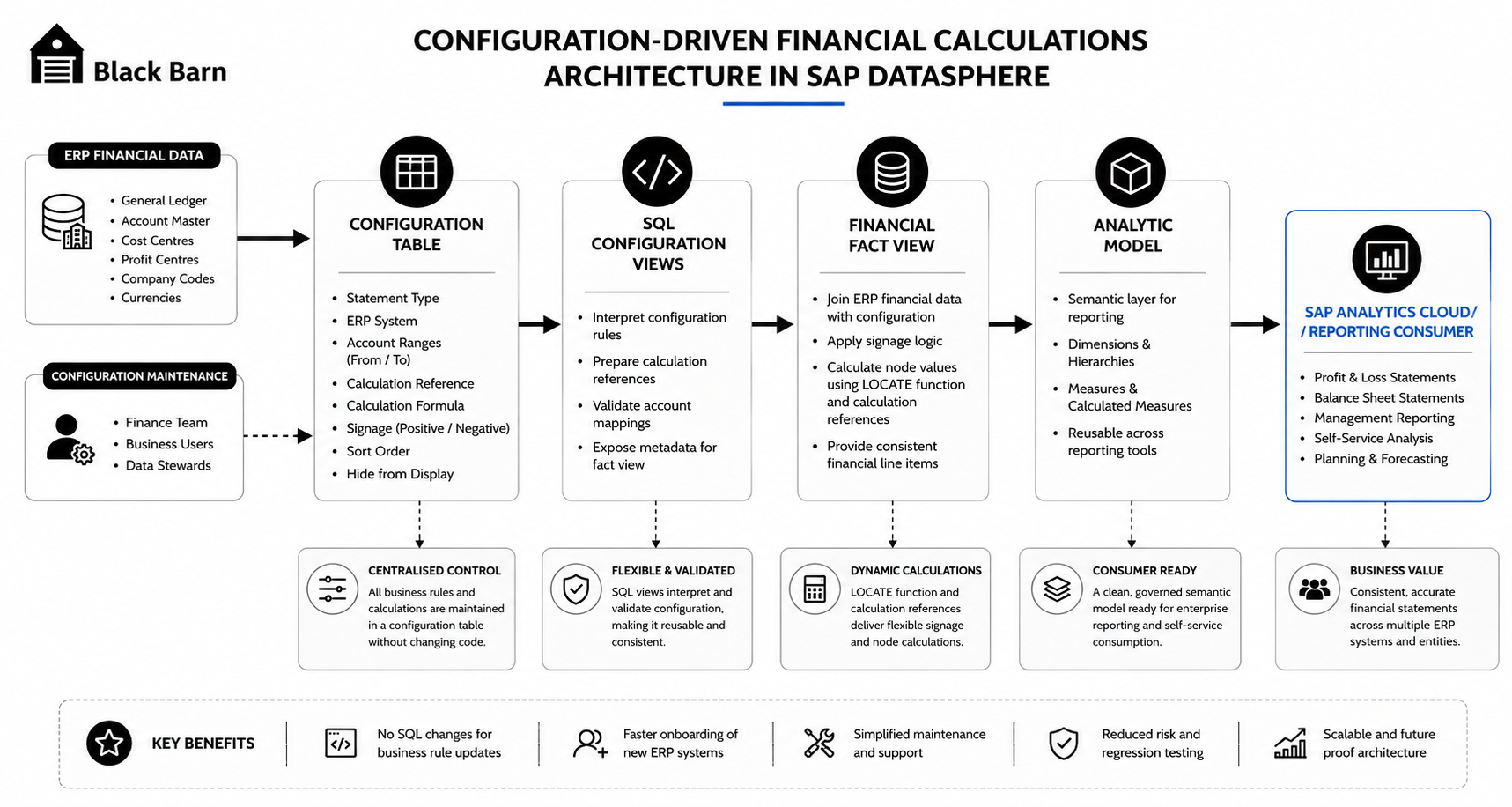
A clean Black Barn technical architecture diagram showing Configuration Table → SQL Configuration Views → Financial Fact View → Analytic Model → SAP Analytics Cloud / reporting consumer. Includes separate inputs for ERP financial data and configuration maintenance.
The recommended architecture separates the solution into four layers.
| Layer | Purpose |
|---|---|
| Configuration table | Stores statement types, line items, account ranges, calculation references, signs and display rules. |
| SQL configuration views | Prepare and normalise the configuration so it can be joined to financial fact data. |
| Financial fact view | Assigns statement items, applies signage and calculates configured nodes. |
| Analytic Model | Provides a reusable semantic model for SAP Analytics Cloud and other consumers. |
The key design principle is that the configuration table defines the financial statement structure, while the SQL Views provide a reusable calculation mechanism.
The SQL should not know that a particular line is Gross Profit because of one hard-coded formula. It should know how to evaluate a configured calculation definition.
Understanding LOCATE
The SQL LOCATE function searches for a substring inside another string.
In simple terms, it answers the question:
Does this value exist inside this configured calculation string, and where does it occur?
A typical syntax pattern is:
LOCATE(<haystack>, <needle>, [<start_position>], [<occurrences>])The function returns the position of the substring if it is found. If the substring is not found, it returns 0. If the relevant input values are NULL, the result is NULL.
In isolation, this sounds like a simple string function. In a configuration-driven financial model, it becomes much more useful.
For example, a configuration string such as this:
(1|-2|)can represent:
Revenue - Cost of Goods SoldA second formula might look like this:
(1|-2|-4|)which can represent:
Revenue - Cost of Goods Sold - Selling, General and AdministrationThe LOCATE function can be used to identify whether a configured calculation reference is present in a calculation string and whether it is included as a positive or negative component.
Designing the configuration table
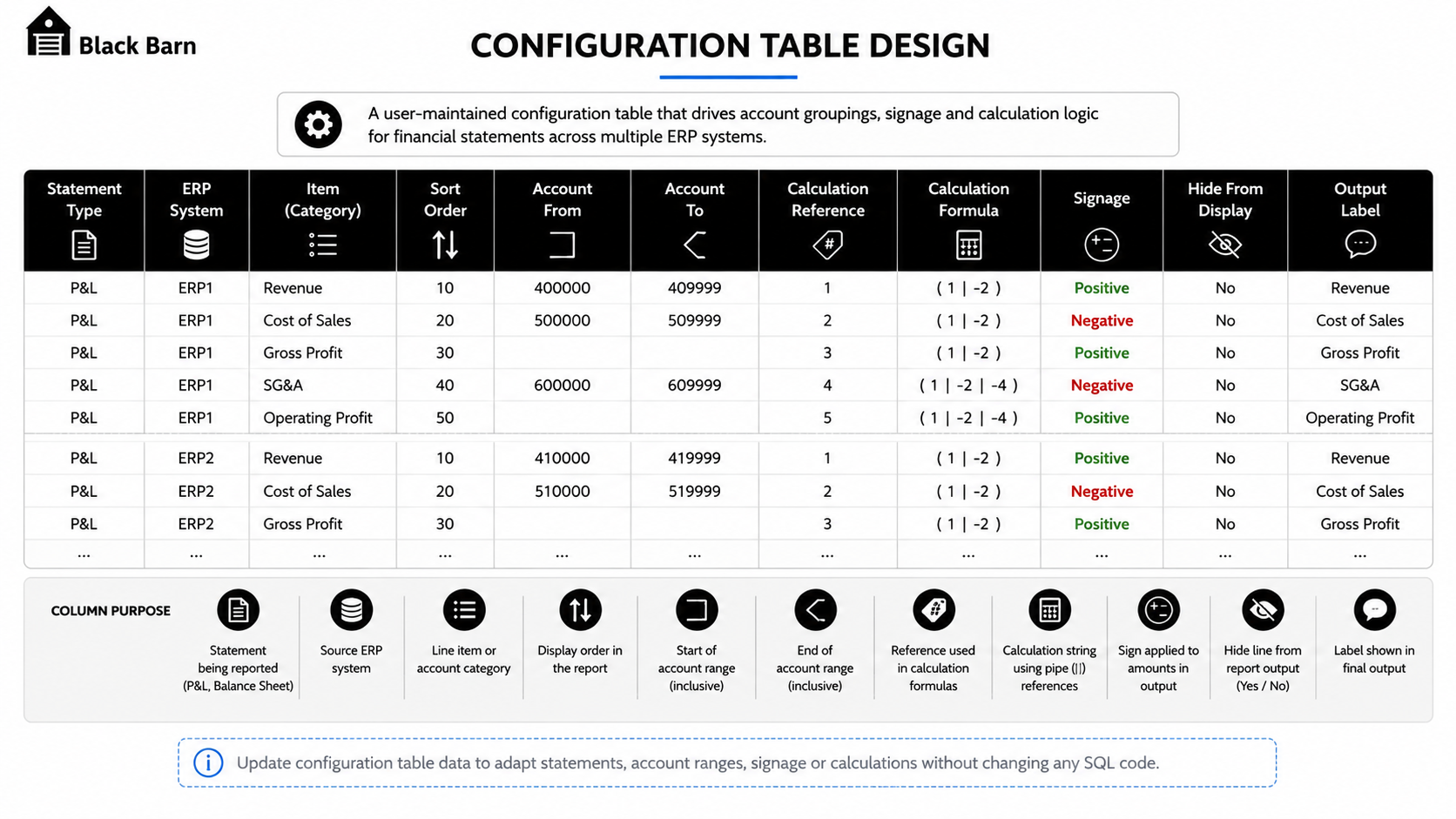
A professional configuration table illustration showing columns for Statement Type, ERP System, Item, Sort Order, Account From, Account To, Calculation Reference, Calculation Formula, Signage, Hide From Display and Output Label.
A good configuration table should be understandable by both technical teams and finance stakeholders.
Typical fields include:
| Field | Purpose |
|---|---|
| Statement Type | Identifies whether the row belongs to a P&L, Balance Sheet or other statement layout. |
| ERP System | Allows different source systems to use different account mapping rules. |
| Item | Defines the financial statement line or grouping. |
| Sort Order | Controls the order in which lines appear in the output report. |
| Account From / To | Defines the account range assigned to the item. |
| Calculation Reference | Provides a stable reference used inside configured formulas. |
| Calculation Formula | Stores node calculations such as `(1 |
| Signage | Controls whether the output should be presented as positive or negative. |
| Hide From Display | Allows supporting lines to be used in calculations without being shown in the final report. |
The configuration table should not be treated as a dumping ground for every possible exception. It should be deliberately designed as a controlled financial statement definition.
Where possible, use stable reference IDs that do not change between releases. If a calculation reference changes, every calculation formula that uses it may also need to change.
Calculation references and signage
Financial statement calculations usually require two types of signage handling.
The first is source signage. This is how the data is stored in the source system. For example, revenue may be stored as negative values in one ERP system and positive values in another.
The second is reporting signage. This is how the value should be displayed in the statement output.
Configuration should make both behaviours explicit.
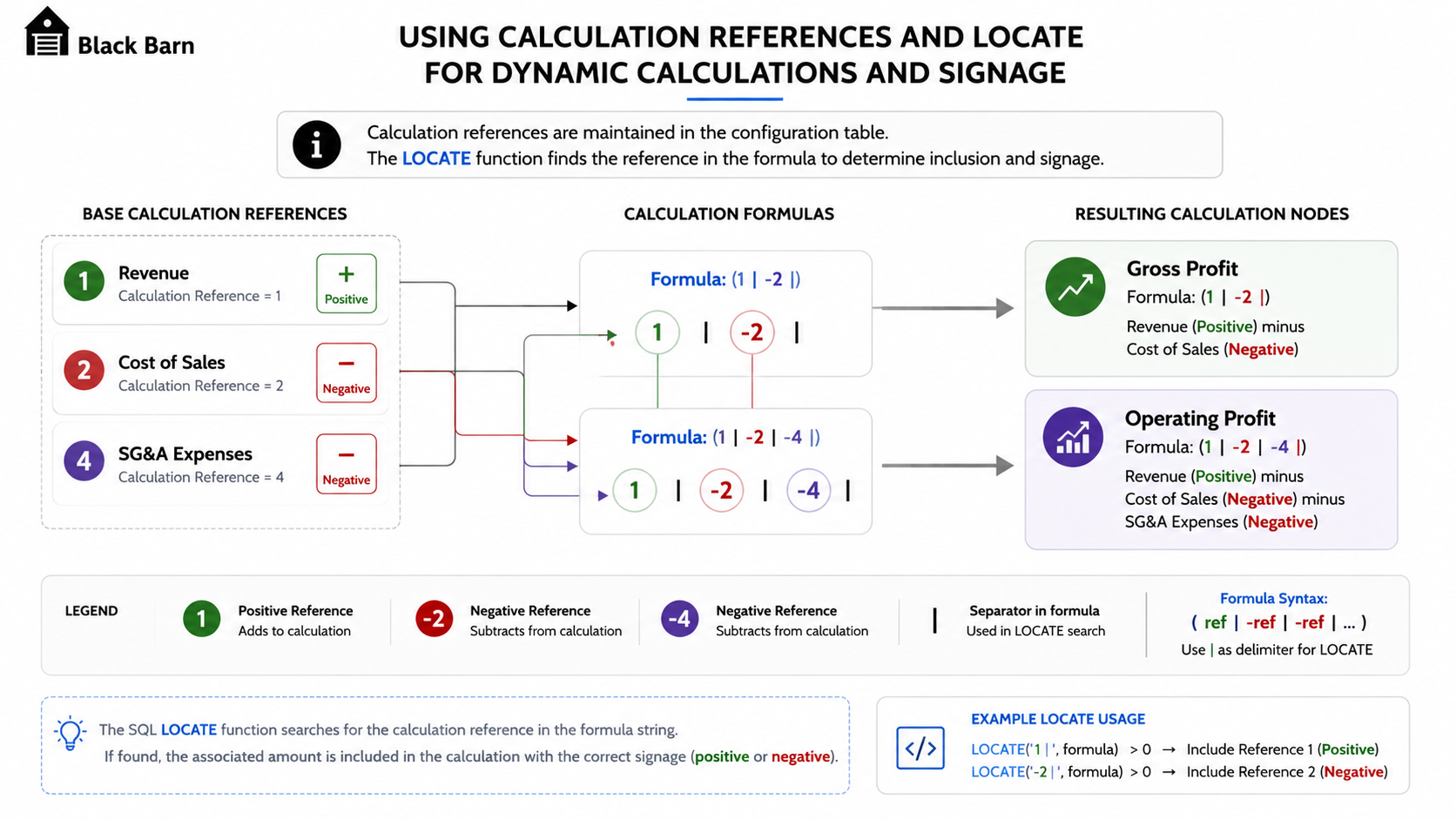
A simple diagram showing calculation references 1, 2 and 4 feeding into formulas (1|-2|) and (1|-2|-4|), with positive and negative signs clearly highlighted and resulting nodes Gross Profit and Operating Profit.
For example:
| Reference | Statement line | Example role |
|---|---|---|
1 | Revenue | Positive component in Gross Profit and Operating Profit. |
2 | Cost of Goods Sold | Negative component in Gross Profit and Operating Profit. |
4 | SG&A | Negative component in Operating Profit. |
A configured formula such as:
(1|-2|)can then be evaluated as:
Revenue - Cost of Goods Sold = Gross ProfitA formula such as:
(1|-2|-4|)can be evaluated as:
Revenue - Cost of Goods Sold - SG&A = Operating ProfitThe important point is that the calculation structure is stored in configuration, not hard-coded into the SQL View.
Using LOCATE in the SQL layer
The SQL layer can use LOCATE to check whether a calculation reference appears inside a configured formula.
A simplified conceptual example is shown below.
CASE
  WHEN LOCATE("CALCULATION_FORMULA", "CALCULATION_REFERENCE") > 0
  THEN "AMOUNT"
  ELSE 0
END
In a real implementation, the expression normally needs to handle positive and negative references separately. For example, the logic may need to distinguish between a reference included as 1 and a reference included as -1.
A pipe delimiter is useful because it reduces false matches.
For example, without a delimiter, reference 1 might accidentally match 10, 11 or 21. A delimited expression such as |1| or |-1| is much safer because the SQL can search for the exact token.
A more robust pattern is therefore to normalise both the formula and the search value before applying LOCATE.
CASE
  WHEN LOCATE("CALCULATION_FORMULA", '|' || "CALCULATION_REFERENCE" || '|') > 0
  THEN "AMOUNT"
  WHEN LOCATE("CALCULATION_FORMULA", '|-' || "CALCULATION_REFERENCE" || '|') > 0
  THEN "AMOUNT" * -1
  ELSE 0
END
The exact SQL will depend on the way the configuration table stores formulas, delimiters and signs, but the principle is consistent: the formula is data, and the SQL engine evaluates that data.
Example output pattern
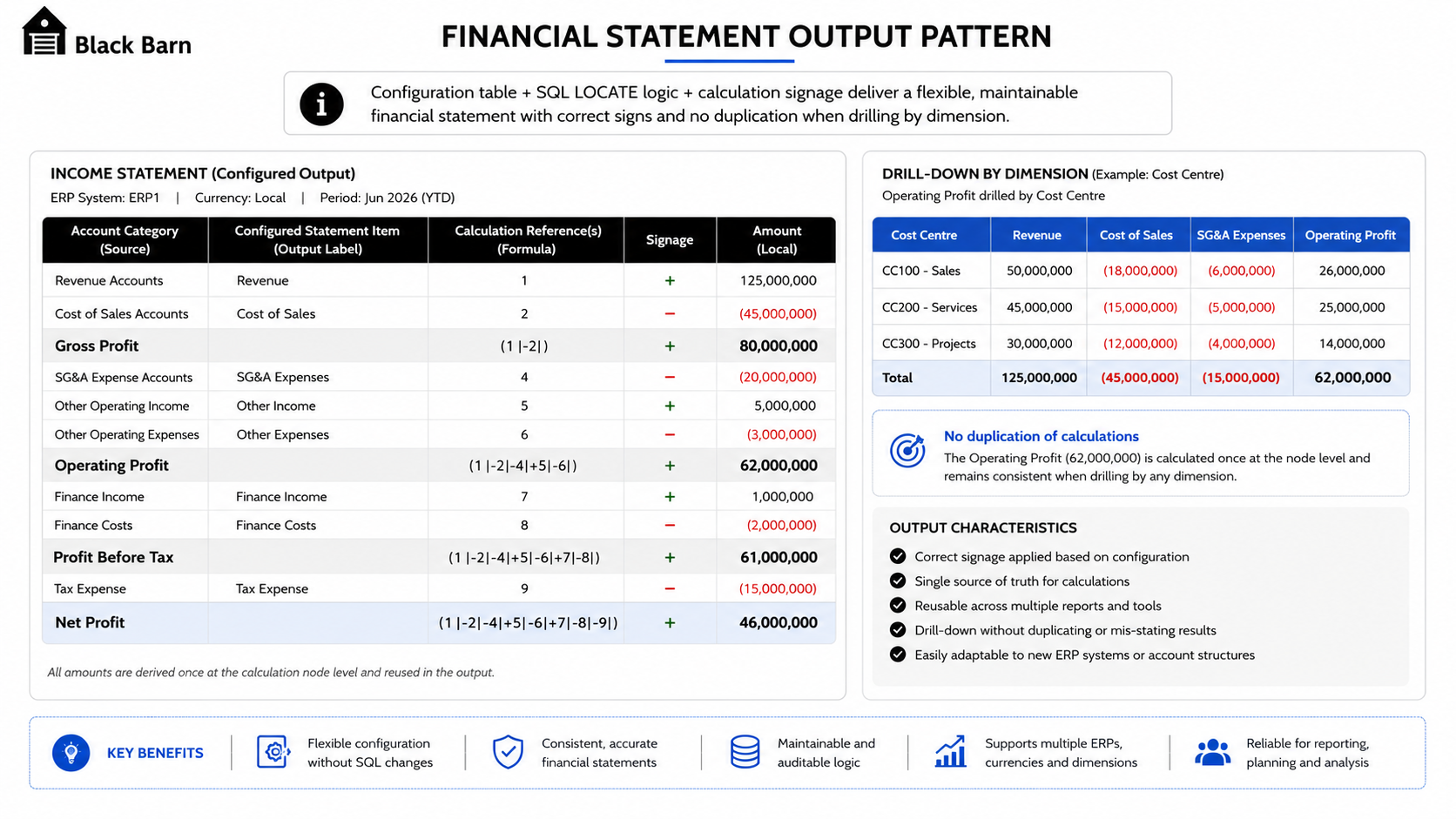
A report-style output mock-up showing account categories, configured statement items, calculation nodes and correctly signed output values. Includes an example of drill-down by dimension without duplicating calculation results.
Once the calculation logic is applied, the reporting output can show both base items and calculated nodes.
For example:
| Sort | Statement item | Output behaviour |
|---|---|---|
| 10 | Revenue | Assigned from configured account range. |
| 20 | Cost of Goods Sold | Assigned from configured account range and signed for reporting. |
| 30 | Gross Profit | Calculated from configured references. |
| 40 | SG&A | Assigned from configured account range and signed for reporting. |
| 50 | Operating Profit | Calculated from configured references. |
This pattern allows users to drill by dimensions such as company code, cost centre, profit centre, region or time period while keeping the financial statement structure consistent.
The calculation nodes should be designed carefully so they do not explode when additional dimensions are added. In practice, this usually means ensuring the aggregation level and joins are deliberately controlled in the SQL Views.
Configuration-driven vs hard-coded SQL
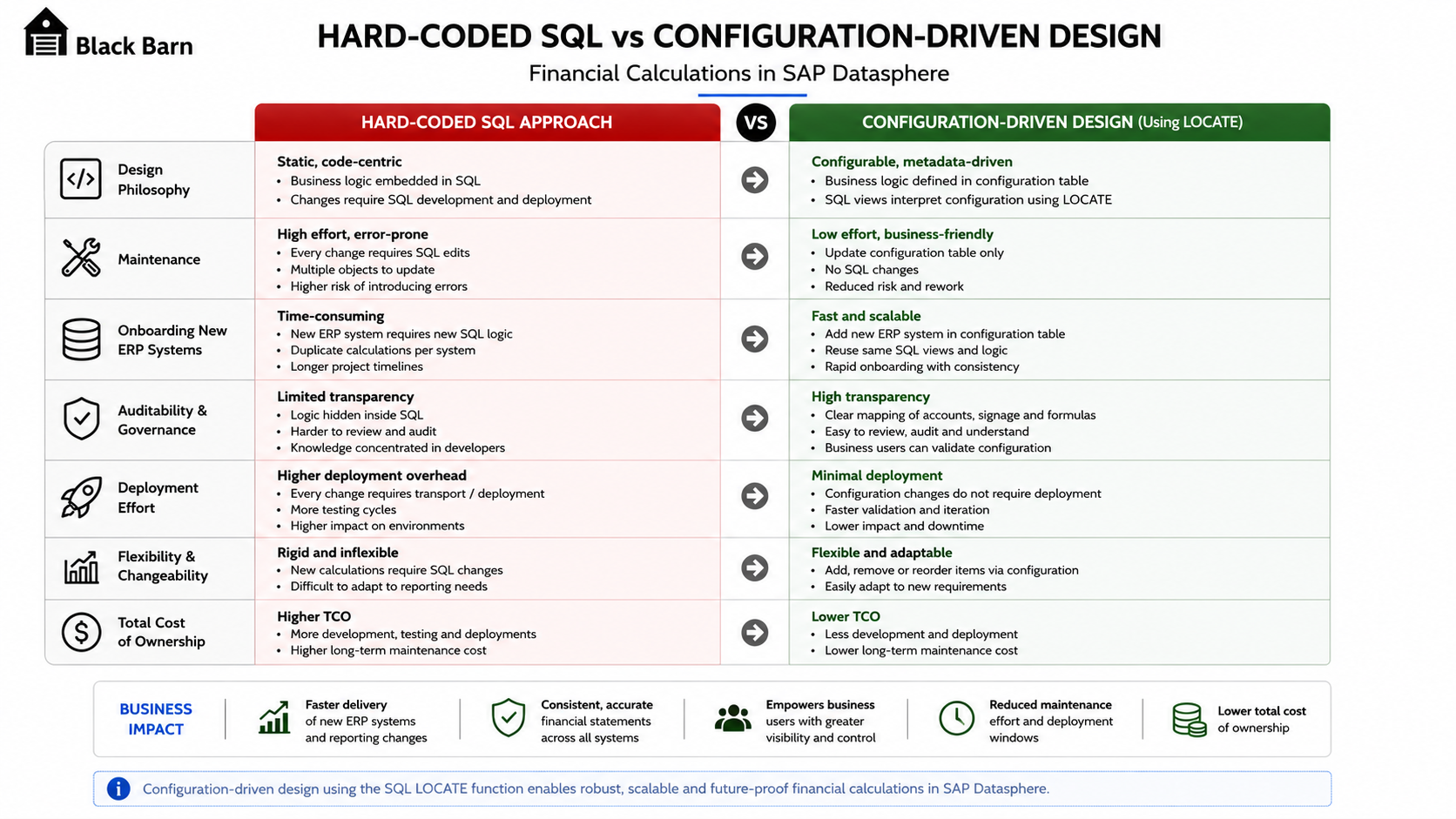
A side-by-side comparison matrix showing hard-coded SQL on the left and configuration-driven financial calculation design on the right. Emphasises maintainability, onboarding new ERP systems, auditability and reduced deployment effort.
The configuration-driven approach is not only a technical preference. It changes the operating model for supporting financial reporting.
| Hard-coded SQL | Configuration-driven model |
|---|---|
| New account mappings require SQL changes. | New account mappings can be added as configuration. |
| ERP-specific rules are embedded in code. | ERP-specific rules are visible in configuration. |
| Testing effort increases as SQL grows. | Testing can focus on configuration changes and standard calculation logic. |
| Support teams need to read complex SQL. | Support teams can inspect a structured configuration table. |
| Statement changes often require deployment. | Statement changes can often be handled through controlled configuration updates. |
| Logic becomes harder to audit. | Configuration can be reviewed and approved as business data. |
For enterprise reporting, the second pattern is usually easier to operate over time.
Practical implementation guidance
Black Barn recommends treating the configuration table as a governed artefact, not an uncontrolled user table.
At a minimum, consider the following controls:
- clear ownership by finance or reporting governance;
- validation checks for duplicate references;
- validation checks for overlapping account ranges;
- a controlled transport or promotion process;
- versioning for major statement changes;
- documentation for each calculation reference;
- testing of all configured formulas before production release.
The SQL View should also be written defensively. Configuration errors should be easy to detect. For example, if a calculation formula references a missing item, the model should make that visible during validation rather than silently producing an incorrect result.
Performance considerations
LOCATE is a lightweight SQL function, but performance still depends on the overall model design.
The configuration table should normally be small compared with the financial fact table. The expensive part of the model is usually not the string search itself, but the way the configuration is joined to the fact data and the level at which calculations are performed.
Good design principles include:
- keep the configuration compact and well-indexed where applicable;
- avoid unnecessary many-to-many joins;
- pre-process or normalise formula strings in a configuration view;
- filter by statement type and ERP system as early as possible;
- avoid deeply nested calculation structures where a simpler hierarchy would work;
- test with realistic data volumes and reporting dimensions;
- keep the final Analytic Model focused on consumption rather than complex transformation.
As with most SAP Datasphere modelling, the best performance comes from clear separation of concerns: configuration preparation, fact assignment, calculation and semantic exposure.
Common pitfalls
Configuration-driven design is powerful, but it needs discipline.
The most common mistakes are:
- using ambiguous calculation references such as
1,10and11without safe delimiters; - allowing overlapping account ranges;
- mixing source-system signage with reporting signage;
- placing too much exception logic into the configuration table;
- creating formulas that only the original developer understands;
- failing to validate configuration before it is consumed by reports;
- creating one-off SQL branches for every new ERP system.
The last point is especially important. The purpose of the pattern is to avoid ERP-specific SQL branches wherever possible. ERP differences should be expressed through configuration unless there is a genuine technical reason to separate the logic.
Black Barn recommendation
Black Barn recommends configuration-driven financial statement modelling where reporting structures are expected to evolve or where multiple ERP systems are involved.
This pattern is particularly suitable when:
- P&L or Balance Sheet structures vary by source system;
- account groupings need to be maintained outside SQL code;
- calculation nodes such as Gross Profit or Operating Profit are required;
- reporting signage differs from source-system signage;
- finance teams need a transparent mapping structure;
- future ERP onboarding is expected.
The SQL LOCATE function is not the whole solution. It is one useful part of a wider configuration-driven design. The real value comes from combining a well-designed configuration table, controlled references, safe delimiters, clear SQL Views and a reusable Analytic Model.
When implemented properly, this approach provides the right balance between flexibility, performance and long-term maintainability.
Conclusion
Financial reporting models should not require a SQL rewrite every time a statement layout, account range or calculation rule changes.
By using a configuration table to define statement lines and calculation formulas, SAP Datasphere can support flexible P&L and Balance Sheet reporting across multiple ERP systems. The SQL LOCATE function provides a practical mechanism for identifying configured calculation references and applying the correct positive or negative contribution to calculated nodes.
The result is a cleaner, more maintainable model that can evolve with the business.
For organisations building SAP Business Data Cloud and SAP Datasphere solutions, configuration-driven financial calculations are a strong pattern for reducing technical debt while giving finance teams the flexibility they need.
Further reading
SAP documentation
- LOCATE Function (String) | SAP Help Portal
- SAP HANA Cloud SQL Reference Guide | SAP Help Portal
- SAP Datasphere | SAP Help Portal
- SAP Business Data Cloud | SAP Help Portal
SAP learning
Need expert help designing scalable SAP Datasphere or SAP Business Data Cloud solutions?
Black Barn provides independent architecture, implementation and advisory services for SAP Datasphere, SAP Analytics Cloud and SAP Business Data Cloud.