Business problem
Enterprise reports often require several technical parameters even though the user should only have to make one business selection.
For example, a user may select a reporting scenario such as CURRENT, but the model may also need a key date, fiscal year, fiscal period, month, planning version or comparison horizon. Asking users to enter every value manually creates friction and increases the risk of inconsistent selections.
Variable Derivation helps solve this by allowing a visible prompt to drive one or more hidden values through a lookup entity.
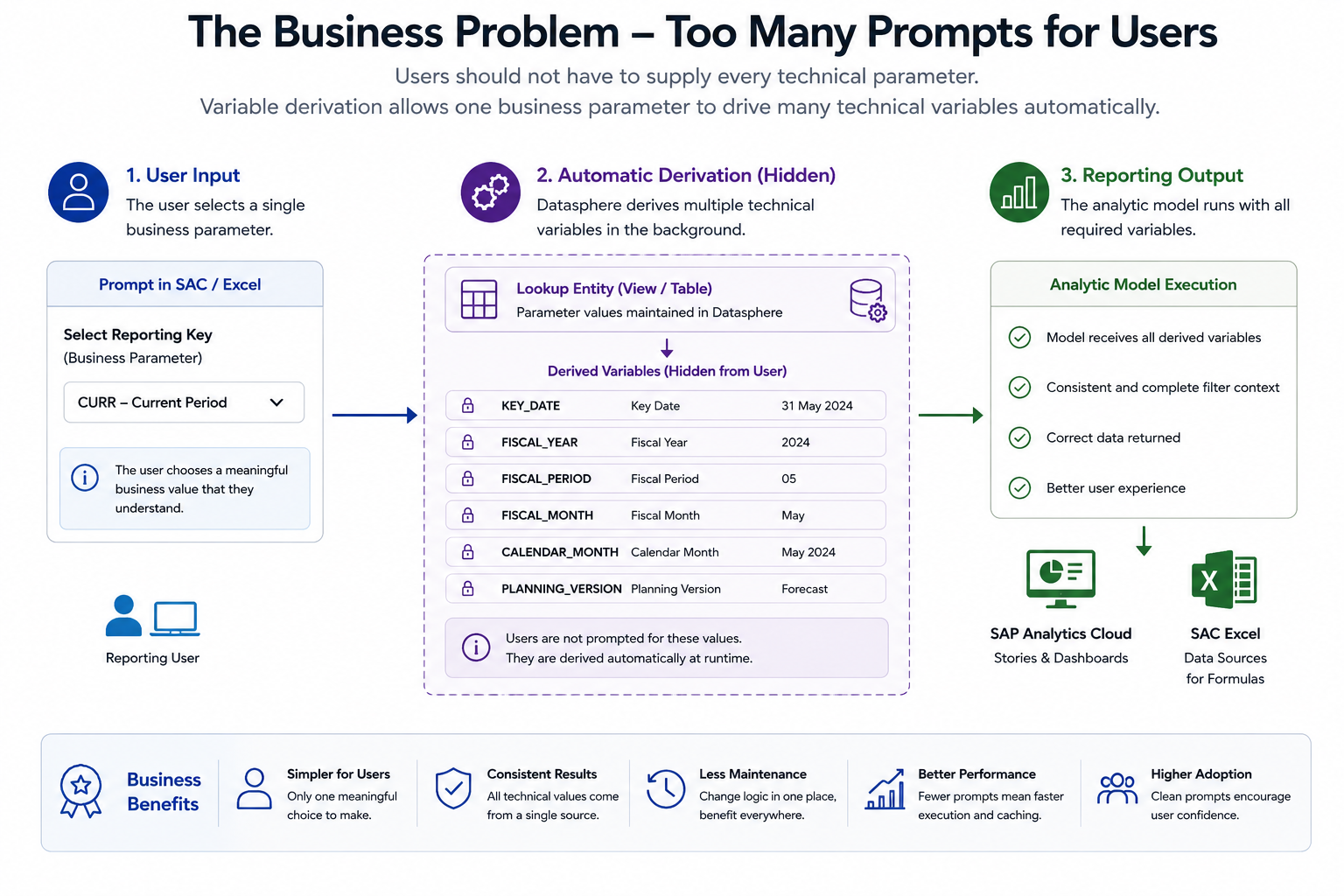
The goal is not to hide important logic from users. The goal is to place complexity in the correct layer so that reports are easier to consume, easier to govern and more consistent across tools.
Why Variable Derivation matters
Variable Derivation is important because it changes the way SAP Datasphere models can handle context.
Without derivation, a model often needs multiple visible prompts. Users must understand which values belong together and must keep selections consistent. That is manageable for technical users, but it is not a strong design for broad enterprise reporting.
With derivation, the user can select a simple business key and the model can derive the technical values required for execution. This is especially useful for:
- default reporting periods
- key dates
- fiscal periods
- planning versions
- organisational filters
- scenario-based assumptions
- reusable reporting parameter sets
In SAP BW, similar requirements were often handled with exit variables. SAP Datasphere does not replicate the BW exit variable model directly, but Variable Derivation provides an important modelling pattern for many of the same business needs.
Product context and roadmap direction
SAP introduced derived variable functionality as part of the continuing evolution of SAP Datasphere Analytic Models. The concept is straightforward: an Analytic Model variable or input parameter can derive its runtime value through a lookup entity, usually a view.
This is a significant step because it allows a model to move beyond static defaults and simple user-entered values.
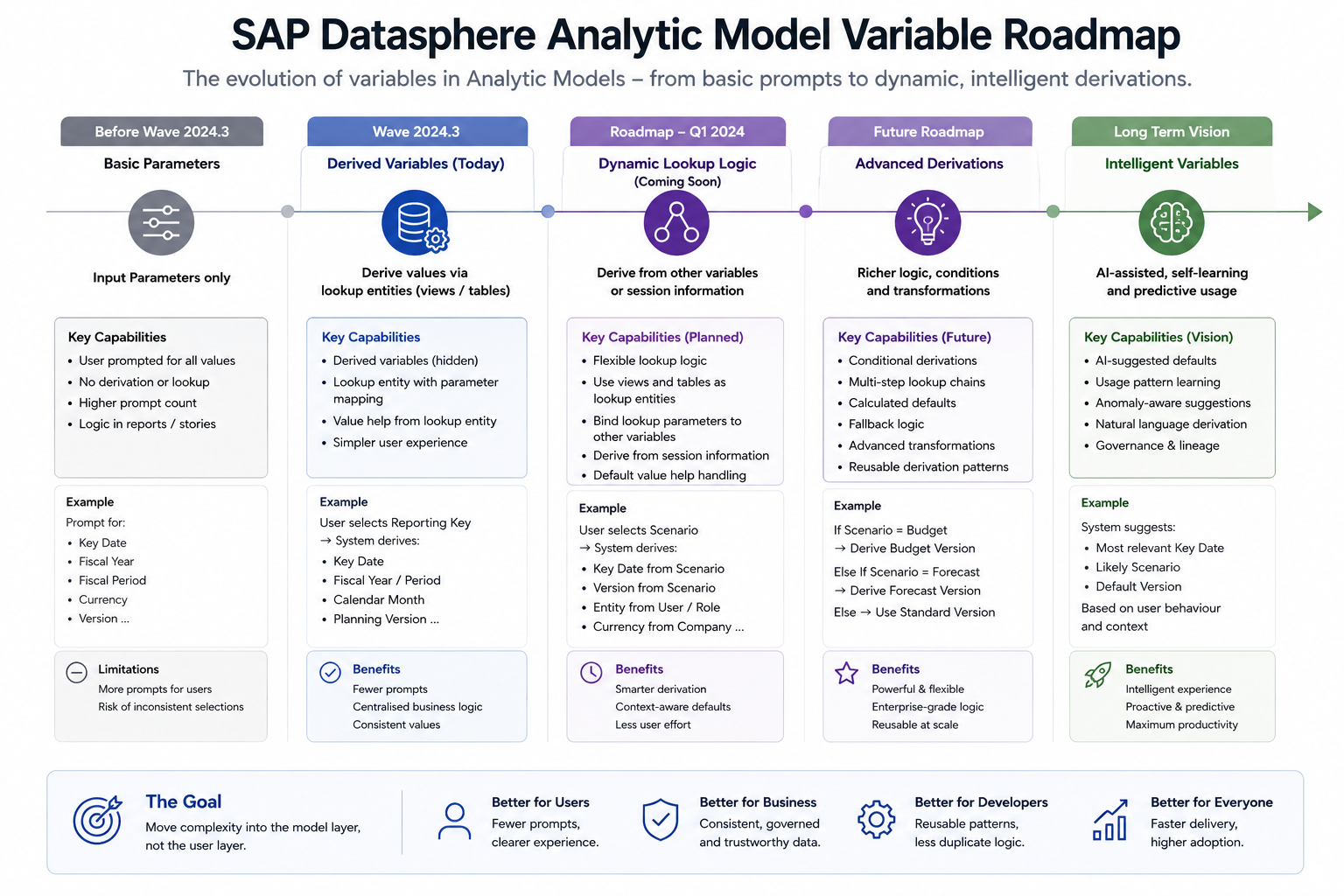
The broader direction is clear. SAP is moving Analytic Models towards richer variable handling, more flexible lookup logic and better support for enterprise reporting scenarios. That does not remove the need for good architecture. If lookup entities and parameter tables are poorly designed, Variable Derivation can still become difficult to maintain.
Concept overview
At a high level, Variable Derivation uses a lookup entity to determine a value at runtime.
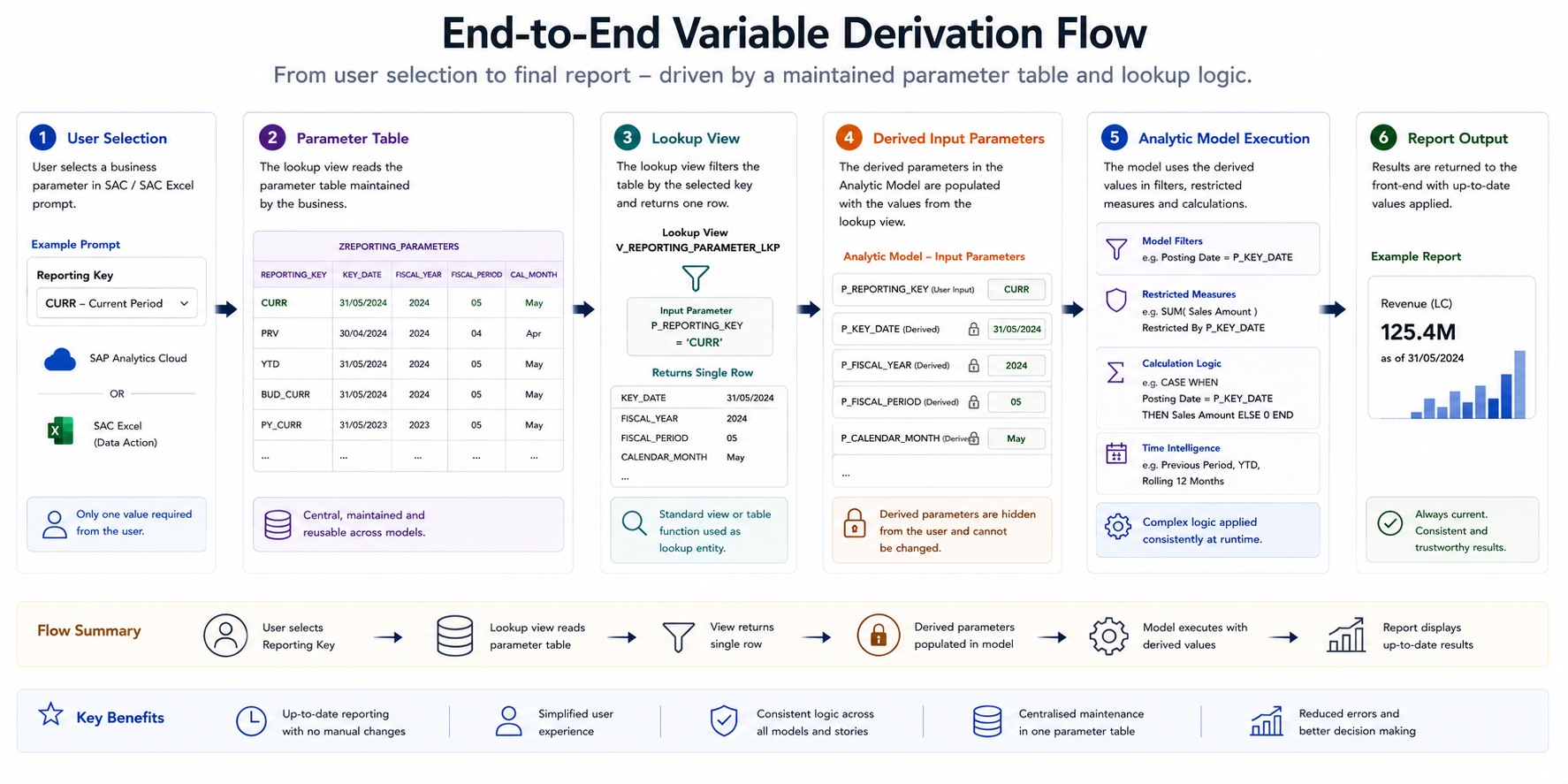
A typical pattern looks like this:
- The user selects a visible input value.
- That value is passed into a lookup entity.
- The lookup entity returns the required derived value.
- The derived value is assigned to a hidden input parameter.
- The Analytic Model executes using the derived value.
- SAP Analytics Cloud or SAP Analytics Cloud add-in for Microsoft Excel consumes the result.
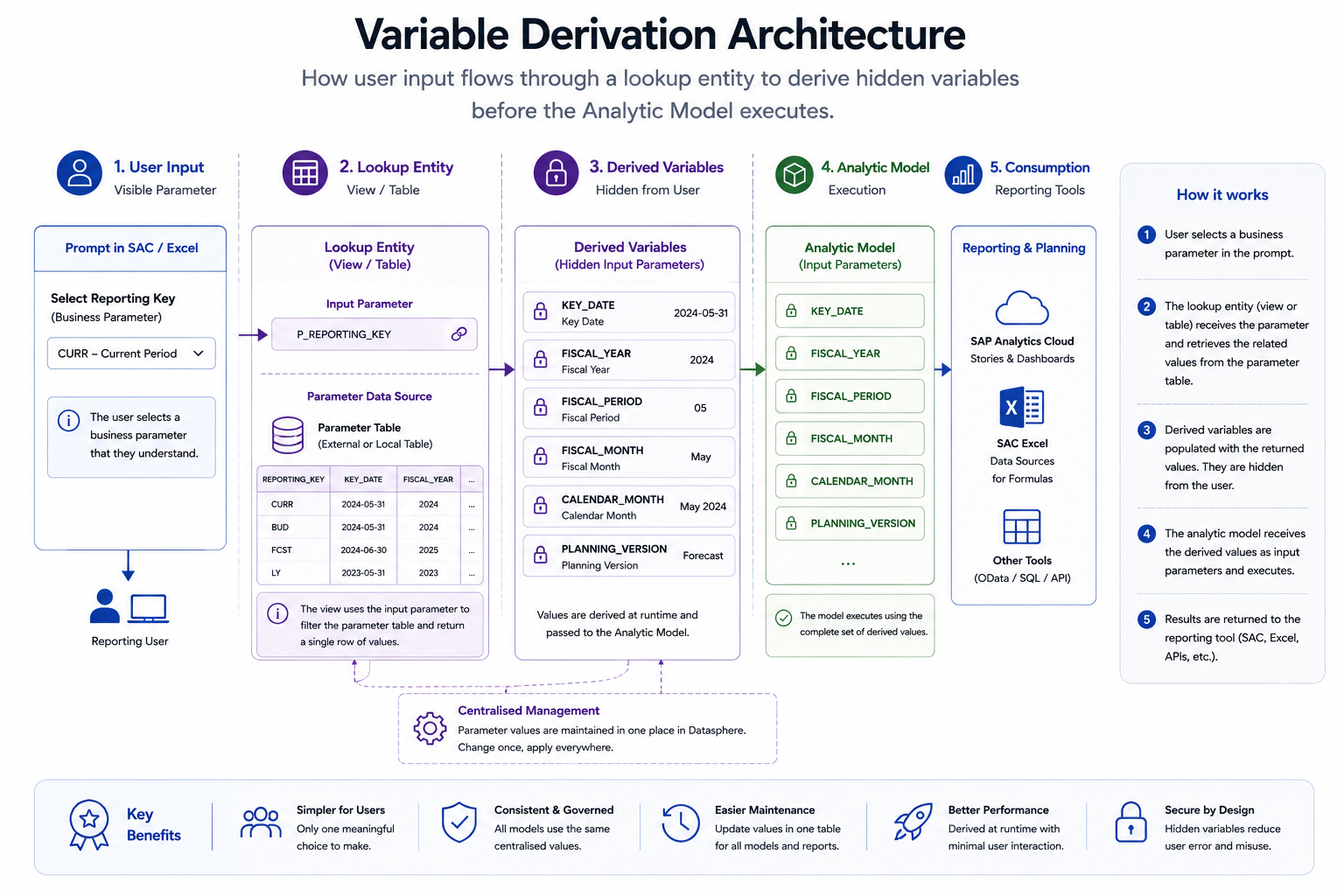
The lookup entity is usually a view over a parameter table or control table. The user may select a parameter key such as CURR, while the model derives the actual key date or period that should be applied.
This pattern keeps the prompt experience simple while allowing the model to use centrally maintained business logic.
Practical scenario: SAC Excel workbooks
A practical scenario is the SAP Analytics Cloud add-in for Microsoft Excel using Data Sources for Formulas.
In testing, a common issue is that the workbook can reopen with the default variable value saved in the Analytic Model rather than the most recent value entered by the user. This can create confusion when users expect a workbook to retain the latest prompt selection.
A derived variable approach can reduce this problem. Instead of relying on each workbook to remember the latest entered date, the workbook can prompt for a business parameter key. The actual key date is then derived from a centrally maintained parameter table.
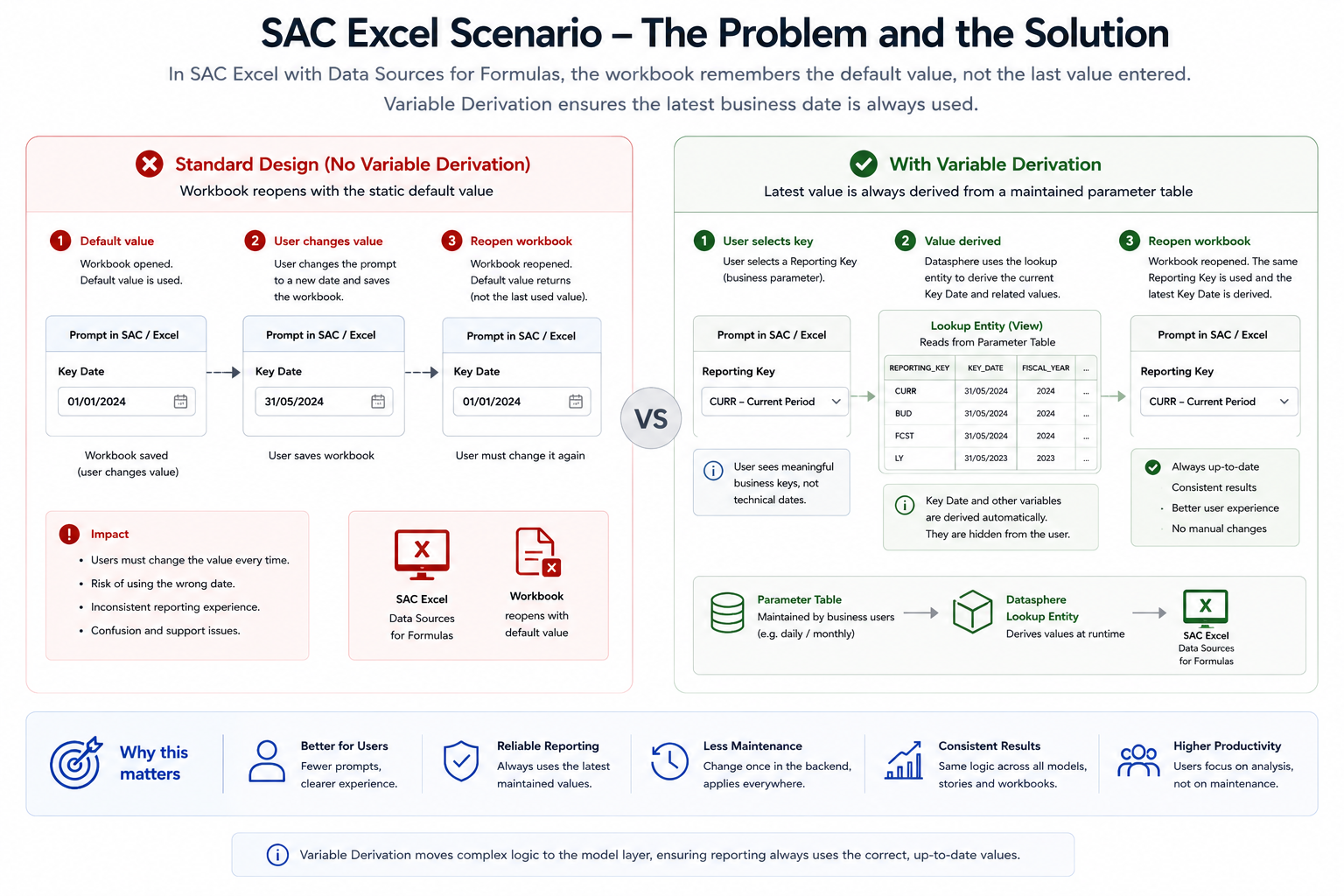
For example, the user selects CURR. The lookup entity reads the maintained values for CURR and returns the current key date, fiscal year, fiscal period or month. The workbook remains stable because the business key does not need to change every month, while the backend parameter values can be maintained centrally.
Recommended architecture
Black Barn recommends treating Variable Derivation as a shared semantic layer capability, not as a one-off Analytic Model trick.
The preferred architecture is:
- A maintained parameter table stores scenario keys and derived values.
- A lookup view exposes those values to the Analytic Model.
- The visible prompt allows the user to choose a parameter key.
- Hidden input parameters derive the technical values from the lookup view.
- The Analytic Model uses the derived values for filtering, key-date logic or calculated behaviour.
- Reporting tools receive a simplified prompt experience.
This design makes the solution easier to explain, test and support.
Step-by-step implementation pattern
Step 1 — Create a parameter table
The parameter table stores reusable parameter sets. For a current reporting scenario, it may contain a key such as CURR, a description and several values such as key date, fiscal year, fiscal period and calendar month.
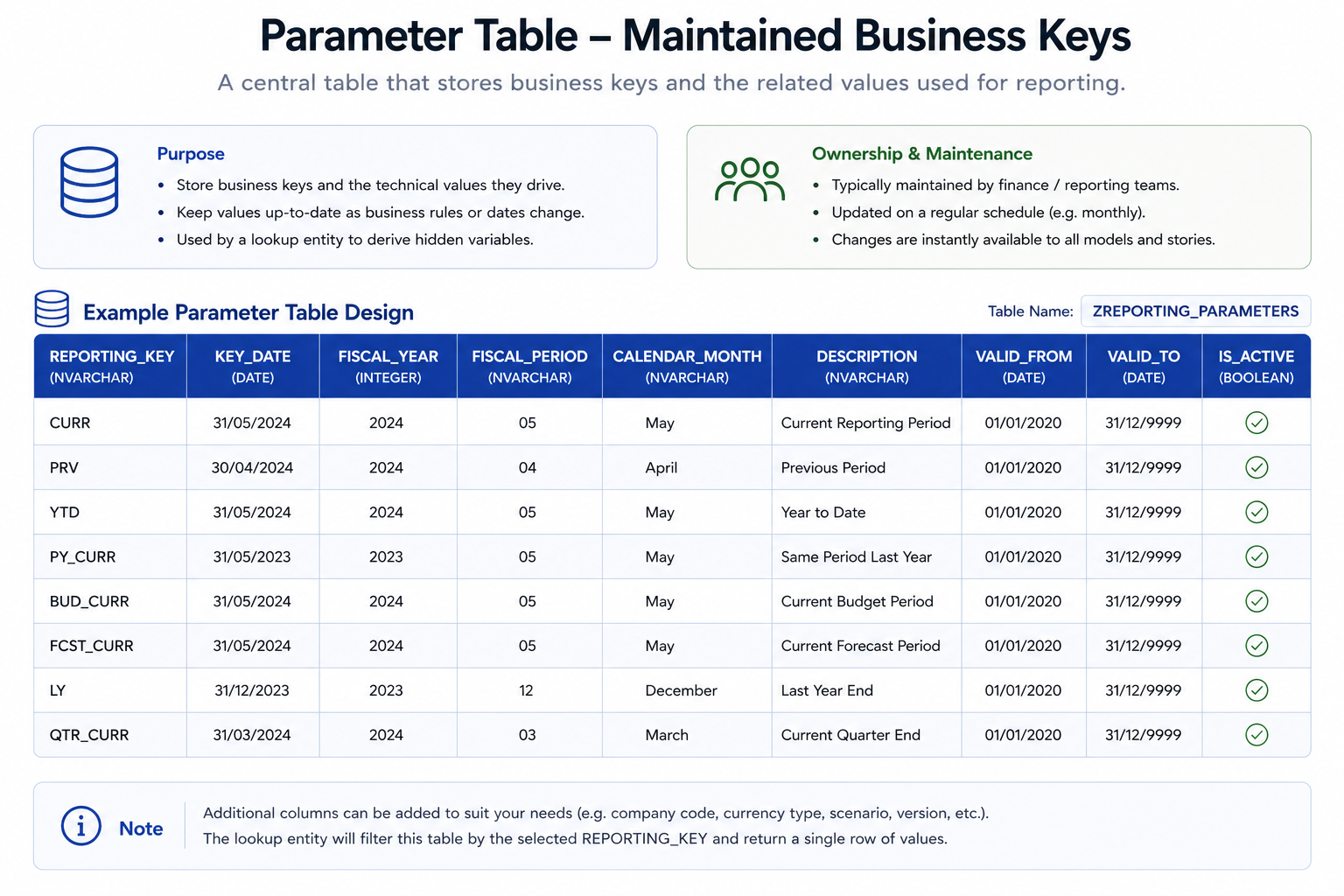
The table can be maintained in an external space, through a controlled upload process or through a small maintenance application. The important point is that it must be governed. If users forget to update the table, the derived values will be wrong even though the model is technically working.
Step 2 — Create a lookup view
The lookup view exposes the parameter table to the Analytic Model. It should return the derived value required by the hidden input parameter.
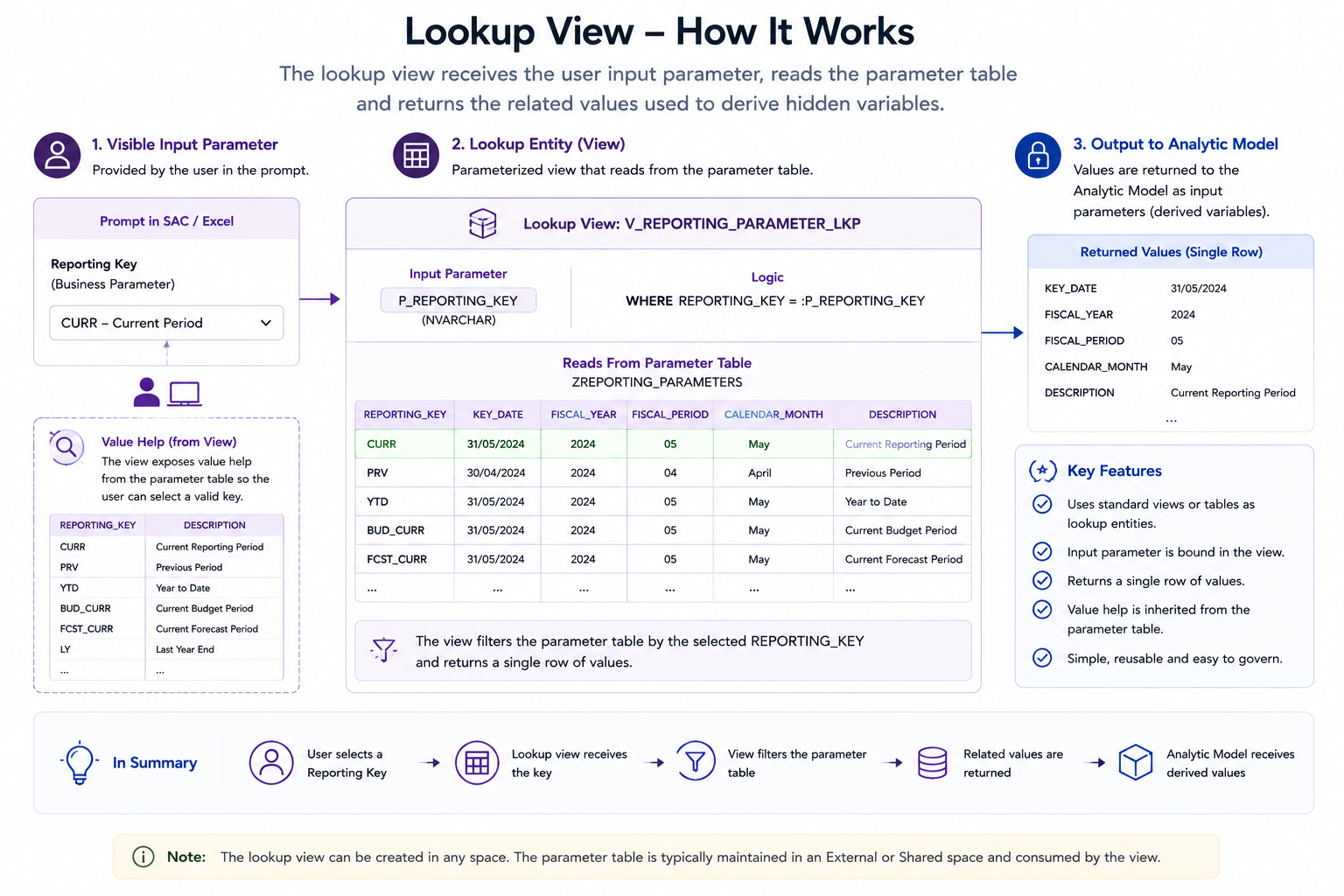
The lookup view should be simple, stable and easy to test. Avoid placing too much unrelated logic into the lookup entity. Its purpose should be clear: receive an input, return the derived value.
Step 3 — Configure the derived input parameter
In the Analytic Model, configure the relevant input parameter as derived and point it to the lookup entity. The mapping determines how the visible user input is passed to the lookup view.
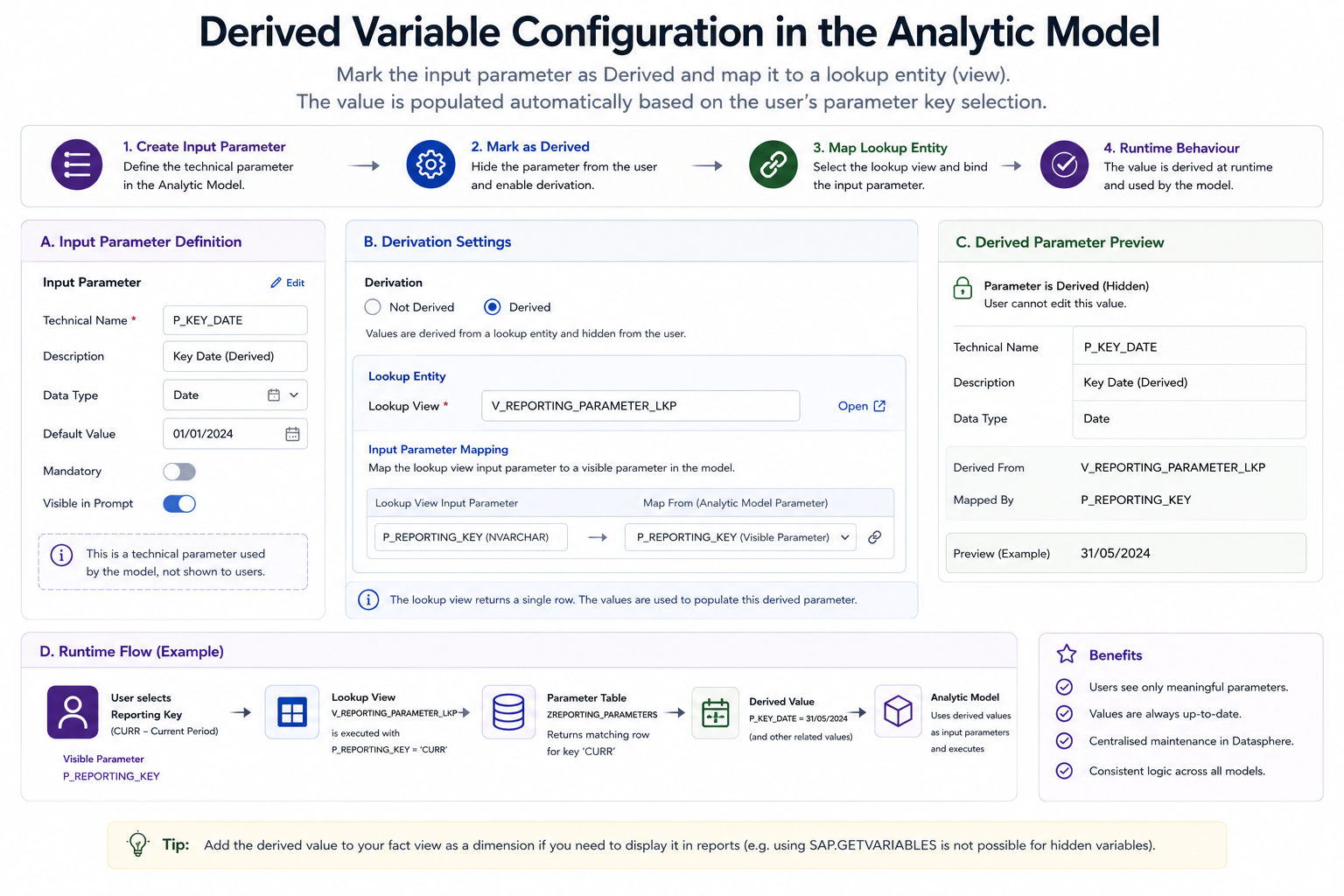
Once an input parameter is derived, it is generally hidden from direct user input. This is useful when the value should be controlled by the model, but it also means the design must be transparent enough for users and support teams to understand what value was applied.
Step 4 — Consume the derived value in the Analytic Model
The derived value can then be used in the Analytic Model for its assigned purpose, such as key-date logic, filtering or parameter-driven calculations.
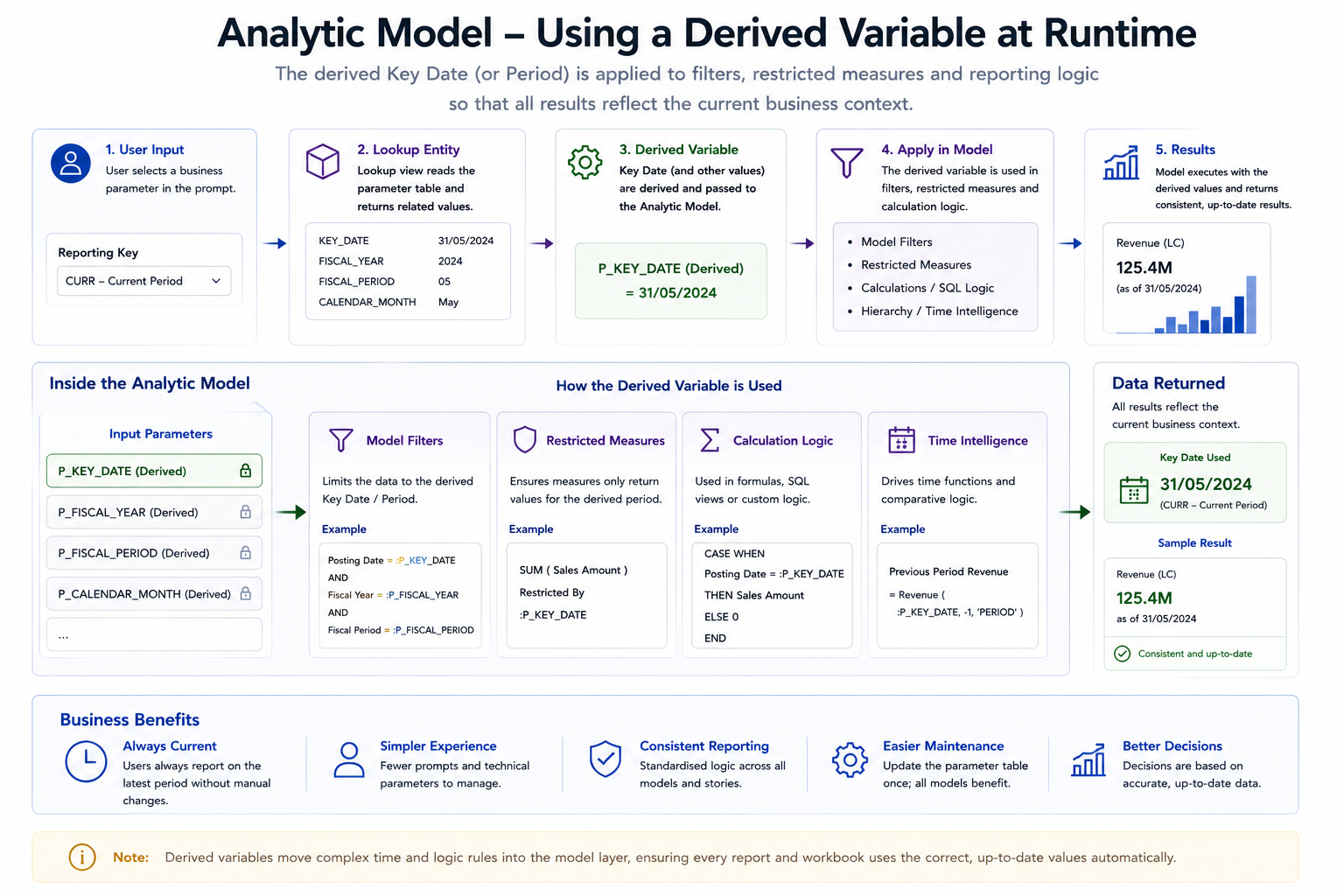
Where possible, consider exposing the selected or derived value as an informational dimension or text attribute. This helps users verify which reporting date, period or scenario is being used.
Step 5 — Validate the full runtime flow
Finally, test the behaviour from the reporting tool, not only inside the Datasphere model editor.
This is especially important for SAC stories and SAC Excel workbooks because prompt behaviour, scripting and formula behaviour may differ from what the model developer expects.
Design considerations
Variable Derivation is powerful, but there are several practical points to consider before using it in production.
| Area | Consideration |
|---|---|
| Input Parameters | Variable Derivation currently applies most naturally to input-parameter style designs. Confirm which object type supports the required behaviour in your tenant and release level. |
| Hidden values | Once a value is derived, users may not be able to enter it directly. This improves control but can reduce transparency. |
| Maintenance | Derived values must come from somewhere. If the source is a manually maintained table, ownership and update timing must be clearly defined. |
| SAC scripting | SAC scripting can usually populate visible parameters, but hidden derived values are not always directly addressable. Design the visible lookup parameter carefully. |
| SAC Excel | Test workbook open, refresh, sign-on and save behaviour. Do not assume it behaves exactly like a SAC table in a story. |
| Formula visibility | Functions such as SAP.GETVARIABLES may not expose hidden derived values. If users need to see the value, model it explicitly as output. |
| Governance | The parameter table becomes business-critical. Treat it like master data or configuration, not like a temporary workaround. |
Best practices
Use a small number of well-designed parameter tables. A single governed table for reporting parameters is usually better than many local tables maintained by different teams.
Use meaningful business keys. Values such as CURR, FCST, BUDGET, PLAN_BASE or MONTH_END are easier to understand than purely technical keys.
Add descriptions. Prompt value help should show both the key and a business-friendly description, especially where the same model is consumed by many users.
Expose the derived value when needed. If a hidden key date drives the report, consider showing the key date in the output so users understand what they are viewing.
Test month-end and year-end changes. Derived parameters often work well during initial testing but fail operationally when maintenance processes are not followed.
Document ownership. Someone must own the parameter table, update process and validation process.
Common mistakes
The most common mistake is treating Variable Derivation as a report-level shortcut rather than a governed modelling pattern.
Other common issues include:
- creating separate parameter tables for each model
- hardcoding dates in lookup views
- hiding values that users need to validate
- relying on manual updates without controls
- failing to test SAC Excel behaviour
- assuming derived variables behave exactly like BW exit variables
- not documenting the meaning of business parameter keys
These issues are avoidable if the design is treated as part of the semantic layer architecture.
Black Barn recommendation
Black Barn recommends using Variable Derivation where it genuinely simplifies the reporting experience and improves consistency.
The best candidates are scenarios where users should select one business value while the model derives one or more technical values in the background. Current reporting periods, key dates, planning versions and scenario-driven defaults are strong examples.
However, the implementation should be centralised and governed. A derived variable is only as reliable as the lookup entity and parameter maintenance process behind it.
Our recommended pattern is:
- maintain reporting parameters centrally
- expose them through reusable lookup views
- keep visible prompts business-friendly
- derive technical values in the model
- expose derived values when transparency is required
- test runtime behaviour in SAC and SAC Excel before production rollout
This provides a clean bridge between classic BW-style dynamic variable behaviour and modern SAP Datasphere semantic modelling.
Further reading
- Add a Variable | SAP Help Portal
- SAP Datasphere Analytic Model Series – Using Variables in Analytic Models | SAP Community
- Create an Input Parameter | SAP Help Portal
- Passing Input Parameters from Analytic Dataset to Analytic Model in SAP Datasphere | SAP Community
Conclusion
Variable Derivation is an important capability for SAP Datasphere Analytic Models. It reduces unnecessary prompts, supports centralised business logic and improves the reporting experience for SAP Analytics Cloud and SAC Excel users.
The feature should not be viewed as a simple workaround for default values. Used properly, it becomes part of the enterprise semantic layer. Parameter tables, lookup entities, hidden input parameters and reporting tools must be designed together.
For organisations moving from SAP BW to SAP Datasphere, Variable Derivation provides a practical way to recover some of the dynamic behaviour previously delivered through exit variables while staying aligned with the Datasphere modelling approach.
Need expert help with SAP Datasphere or SAP Business Data Cloud?
Black Barn provides architecture, implementation, training and advisory services for SAP Datasphere, SAP Analytics Cloud and SAP Databricks.